> ## Documentation Index
> Fetch the complete documentation index at: https://docs.smartcookieapp.com/llms.txt
> Use this file to discover all available pages before exploring further.
> ## Agent Instructions
> This is the SmartCookie help center for teachers and their students. Answer in the reader's language (Spanish pages have no prefix, English pages start with /en). Only describe features documented here; if something is not documented, say you don't know and point to /contact-support.
# Delete your SmartCookie account
> Permanently delete your teacher account and all your data: what gets deleted, what doesn't and what to do first.
You can delete your account from **Profile**. It's deleted straight away, with all your data, and can't be recovered.
If you only want to stop paying, you don't need to delete it: [Change or cancel your membership](/en/account/manage-subscription). That way your data is kept.
## Before you start
* Download anything you want to keep. Your bills: in **Payments** > **Bills view**, open each one and click the arrow next to **Open request** > **Download PDF**. Your membership invoices: in **Profile** > **Subscription**.
* If you take payments with Stripe, check your money with **View your payouts**, in **Payment setup** > **Online payments**: [Take card payments: connect Stripe](/en/payments/connect-stripe).
## Delete your account
There's no going back. As soon as you confirm from the email, your account and your data are deleted for good.
1. Click your photo or initials at the top right and choose **Profile**.
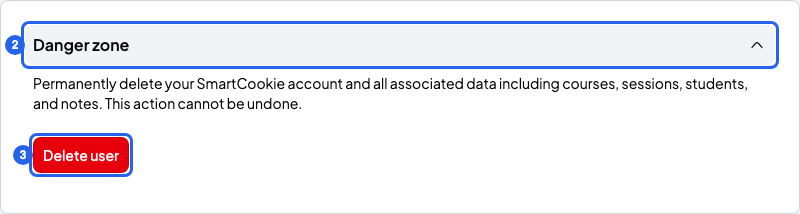
2. At the bottom of the page, click **Danger zone** to open the section.
3. Click **Delete user**.
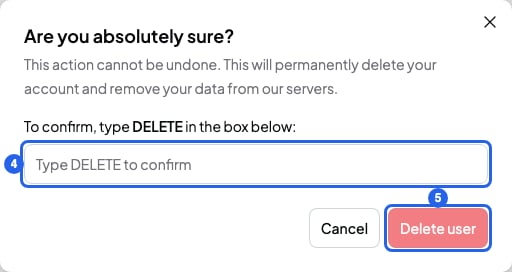
4. In the "Are you absolutely sure?" window, type **DELETE** in capitals.
5. Click **Delete user**. You'll see a message: we've sent you an email.
6. Open the "Account Deletion Request" email and click **Confirm Account Deletion** within 24 hours. Open it on the same computer or phone where you have SmartCookie open.
7. Your account is deleted and you'll see the login page.
 If the email doesn't arrive, check your spam folder. You can only ask for another one after 24 hours.
## What gets deleted
* Your students, courses, sessions and notes.
* Your bills and your packs. The payment links you sent stop working.
* Your availability, your reminders and your billing details.
* Your booking link and your student portal. Your students can no longer book or log in to their portal, and they aren't notified. Your link name becomes free for someone else.
* Your photo and your logo.
* Your membership: it's cancelled straight away and the rest of the month or year isn't refunded. If you think you're due a refund, ask for it before you delete your account: [Free trial and SmartCookie membership](/en/account/trial-and-plans).
## What doesn't get deleted
* Your Stripe account. It stays open and any money in it is still yours. SmartCookie just stops being connected to it.
* The "SmartCookie" calendar in your Google Calendar, with its events. If you don't want it, delete it yourself in Google Calendar.
## What you can't do
* You can't undo it or recover your data: there's no waiting period.
* You can't pause your account. Instead, cancel your membership: your data is kept.
## Related articles
* [Change or cancel your membership](/en/account/manage-subscription)
* [Free trial and SmartCookie membership](/en/account/trial-and-plans)
* [Connect Google Calendar](/en/integrations/google-calendar)
* [Contact support](/en/contact-support)
If the email doesn't arrive, check your spam folder. You can only ask for another one after 24 hours.
## What gets deleted
* Your students, courses, sessions and notes.
* Your bills and your packs. The payment links you sent stop working.
* Your availability, your reminders and your billing details.
* Your booking link and your student portal. Your students can no longer book or log in to their portal, and they aren't notified. Your link name becomes free for someone else.
* Your photo and your logo.
* Your membership: it's cancelled straight away and the rest of the month or year isn't refunded. If you think you're due a refund, ask for it before you delete your account: [Free trial and SmartCookie membership](/en/account/trial-and-plans).
## What doesn't get deleted
* Your Stripe account. It stays open and any money in it is still yours. SmartCookie just stops being connected to it.
* The "SmartCookie" calendar in your Google Calendar, with its events. If you don't want it, delete it yourself in Google Calendar.
## What you can't do
* You can't undo it or recover your data: there's no waiting period.
* You can't pause your account. Instead, cancel your membership: your data is kept.
## Related articles
* [Change or cancel your membership](/en/account/manage-subscription)
* [Free trial and SmartCookie membership](/en/account/trial-and-plans)
* [Connect Google Calendar](/en/integrations/google-calendar)
* [Contact support](/en/contact-support)