> ## Documentation Index
> Fetch the complete documentation index at: https://docs.smartcookieapp.com/llms.txt
> Use this file to discover all available pages before exploring further.
> ## Agent Instructions
> This is the SmartCookie help center for teachers and their students. Answer in the reader's language (Spanish pages have no prefix, English pages start with /en). Only describe features documented here; if something is not documented, say you don't know and point to /contact-support.
# Booking rules: notice, cancellation and buffers
> Every booking rule of a course: what each one does, which values it takes and what it's set to if you don't change it.
Each course with online booking has its own booking rules. They set how far ahead students book, until when they can cancel and at what times sessions start. They're in the course's **Online booking** section and only show when **Allow students to book sessions** is on. To open it, see [Let students book sessions](/en/booking/turn-on-booking).
 ## Rules in the booking sentence
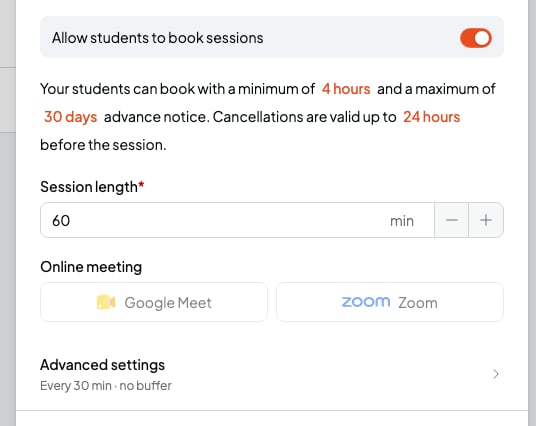
Below the switch there's a sentence with three numbers. If you type a number outside the range, SmartCookie sets the minimum or the maximum.
### Minimum notice
It's the first number: how many hours before the start students have to book, at least. With 4 hours, at 10am nobody can book a session before 2pm.
From 0 to 168 hours (7 days). If you don't change it, it's 4 hours.
### Maximum advance booking
It's the second number: how many days ahead students can book. With 30 days, on 1 October students can book up to 31 October.
From 1 to 365 days. If you don't change it, it's 30 days.
### Cancellation cutoff
It's the third number: until how many hours before the session your students can change or cancel it from their confirmation email. With 24 hours, a session on Tuesday at 5pm can be changed until Monday at 5pm. After that, they have to talk to you. You can always change or cancel your sessions.
If you change this number, it also applies to the bookings you already have.
From 0 to 168 hours (7 days). If you don't change it, it's 24 hours.
## Length and online meeting
### Session length
How long each booked session lasts. A time is only offered if the whole session fits inside your availability.
From 5 to 480 minutes (8 hours). If you don't change it, it's 60 minutes.
### Online meeting
Choose **Google Meet** so each booked session gets its own Google Meet link. You need Google Calendar connected. **Zoom** isn't available yet. More in [Add a Google Meet link to a session](/en/calendar/google-meet).
If you don't change it, booked sessions have no link.
## Advanced settings
Click **Advanced settings**, at the end of the **Online booking** section, to see two more rules.
## Rules in the booking sentence
Below the switch there's a sentence with three numbers. If you type a number outside the range, SmartCookie sets the minimum or the maximum.
### Minimum notice
It's the first number: how many hours before the start students have to book, at least. With 4 hours, at 10am nobody can book a session before 2pm.
From 0 to 168 hours (7 days). If you don't change it, it's 4 hours.
### Maximum advance booking
It's the second number: how many days ahead students can book. With 30 days, on 1 October students can book up to 31 October.
From 1 to 365 days. If you don't change it, it's 30 days.
### Cancellation cutoff
It's the third number: until how many hours before the session your students can change or cancel it from their confirmation email. With 24 hours, a session on Tuesday at 5pm can be changed until Monday at 5pm. After that, they have to talk to you. You can always change or cancel your sessions.
If you change this number, it also applies to the bookings you already have.
From 0 to 168 hours (7 days). If you don't change it, it's 24 hours.
## Length and online meeting
### Session length
How long each booked session lasts. A time is only offered if the whole session fits inside your availability.
From 5 to 480 minutes (8 hours). If you don't change it, it's 60 minutes.
### Online meeting
Choose **Google Meet** so each booked session gets its own Google Meet link. You need Google Calendar connected. **Zoom** isn't available yet. More in [Add a Google Meet link to a session](/en/calendar/google-meet).
If you don't change it, booked sessions have no link.
## Advanced settings
Click **Advanced settings**, at the end of the **Online booking** section, to see two more rules.
 ### Start time increments
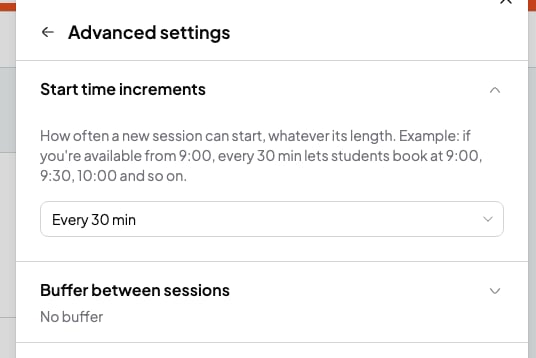
How often a session can start, counting from the start of each slot in your availability. With **Every 30 min** and a slot from 9am, students can book at 9am, 9:30am, 10am...
You can choose every 5, 10, 15, 20, 30, 45 or 60 minutes. If you don't change it, it's **Every 30 min**.
### Buffer between sessions
Free time SmartCookie keeps before and after each of your sessions. Times that would cut into it aren't offered. With 15 minutes and a session until 11am, the next booking starts at 11:15am or later.
You can choose **No buffer**, 5, 10, 15, 30, 45 or 60 minutes. If you don't change it, it's **No buffer**.
## Which rules count for each course type
* **1 to 1 lessons** and **Meetings 1 to 1**: all of them.
* **Open doors**: only the maximum advance booking and the cancellation cutoff. Your sessions already have their time and length, and people can sign up until they start. The Google Meet link is added on each session.
## Related articles
* [Let students book sessions](/en/booking/turn-on-booking)
* [Set your availability](/en/booking/set-availability)
* [Add a Google Meet link to a session](/en/calendar/google-meet)
* [Students: book, reschedule or cancel a session](/en/for-students/book-a-session)
### Start time increments
How often a session can start, counting from the start of each slot in your availability. With **Every 30 min** and a slot from 9am, students can book at 9am, 9:30am, 10am...
You can choose every 5, 10, 15, 20, 30, 45 or 60 minutes. If you don't change it, it's **Every 30 min**.
### Buffer between sessions
Free time SmartCookie keeps before and after each of your sessions. Times that would cut into it aren't offered. With 15 minutes and a session until 11am, the next booking starts at 11:15am or later.
You can choose **No buffer**, 5, 10, 15, 30, 45 or 60 minutes. If you don't change it, it's **No buffer**.
## Which rules count for each course type
* **1 to 1 lessons** and **Meetings 1 to 1**: all of them.
* **Open doors**: only the maximum advance booking and the cancellation cutoff. Your sessions already have their time and length, and people can sign up until they start. The Google Meet link is added on each session.
## Related articles
* [Let students book sessions](/en/booking/turn-on-booking)
* [Set your availability](/en/booking/set-availability)
* [Add a Google Meet link to a session](/en/calendar/google-meet)
* [Students: book, reschedule or cancel a session](/en/for-students/book-a-session)