> ## Documentation Index
> Fetch the complete documentation index at: https://docs.smartcookieapp.com/llms.txt
> Use this file to discover all available pages before exploring further.
> ## Agent Instructions
> This is the SmartCookie help center for teachers and their students. Answer in the reader's language (Spanish pages have no prefix, English pages start with /en). Only describe features documented here; if something is not documented, say you don't know and point to /contact-support.
# Add a session
> Add a session to your SmartCookie calendar, from the calendar or from the course page.
You can add a session from your calendar or from its course page. Every session belongs to a course, and SmartCookie adds that course's students to the session.
## Before you start
* You need a course: [Create a course](/en/courses/create-a-course).
* In **1 to 1 lessons** and **Group lessons**, the course needs at least one student.
## Add a session from the calendar
1. In the menu on the left, click **Calendar**.
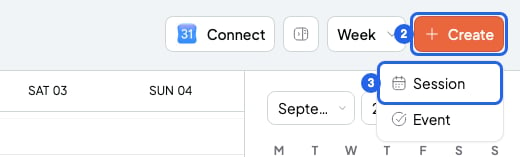
2. Click **Create**, at the top right.
3. Choose **Session**. A small window opens for the new session.
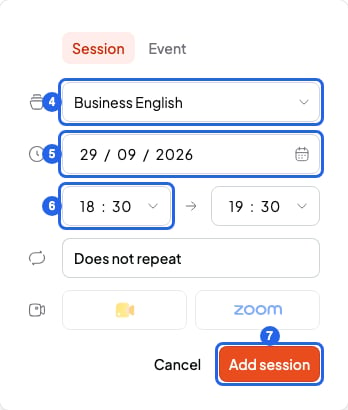
 4. In **Select a course**, choose the session's course.
5. Choose the date.
6. Choose the start time and the end time.
7. Click **Add session**. The session shows up in your calendar.
4. In **Select a course**, choose the session's course.
5. Choose the date.
6. Choose the start time and the end time.
7. Click **Add session**. The session shows up in your calendar.
 Do you want the session to repeat every week? Read [Repeat a session (recurring sessions)](/en/calendar/recurring-sessions) before you click **Add session**.
A shortcut: in the **Day** or **Week** view, click the start time and, without letting go, drag to the end time. The new session window opens. In the **Month** view, double-click a day.
## Add a session from the course page
1. In **Courses**, open the course.
2. In the **Sessions** tab, click **Add session**. The course is already chosen.
3. Choose the date and time.
4. Click **Add session**. The session shows up in the course list and in your calendar.
## If the session clashes with another one
An event is something in your calendar with no students, like the dentist. If you already have a session or an event at that time, you'll see **Calendar conflict detected**. Click **View** to see what it clashes with. Then change the time, or click **Add with conflicts** to add it anyway.
## If you can't add the session
* You see **No student enrolled here**: the course has no students. Click the button next to it (**View group**). In the **Students** tab, click **Add student**.
* You see **Copy and send your link to your students so that they can book**: it's a **Meetings 1 to 1** course. In this type, each booking creates its session.
* It's an **Open doors** course and you can't add the session: in the session window, fill in **Max participants** with the number of places.
## What you can't do
* You can't choose which of the course's students go to a session. The session includes every student in the course.
* You can't add a Zoom link yet. To add a Google Meet link: [Add a Google Meet link to a session](/en/calendar/google-meet).
## Related articles
* [Repeat a session (recurring sessions)](/en/calendar/recurring-sessions)
* [Session notes and quick notes](/en/notes/session-notes)
* [Create a course](/en/courses/create-a-course)
* [Which course type to choose](/en/courses/course-types)
Do you want the session to repeat every week? Read [Repeat a session (recurring sessions)](/en/calendar/recurring-sessions) before you click **Add session**.
A shortcut: in the **Day** or **Week** view, click the start time and, without letting go, drag to the end time. The new session window opens. In the **Month** view, double-click a day.
## Add a session from the course page
1. In **Courses**, open the course.
2. In the **Sessions** tab, click **Add session**. The course is already chosen.
3. Choose the date and time.
4. Click **Add session**. The session shows up in the course list and in your calendar.
## If the session clashes with another one
An event is something in your calendar with no students, like the dentist. If you already have a session or an event at that time, you'll see **Calendar conflict detected**. Click **View** to see what it clashes with. Then change the time, or click **Add with conflicts** to add it anyway.
## If you can't add the session
* You see **No student enrolled here**: the course has no students. Click the button next to it (**View group**). In the **Students** tab, click **Add student**.
* You see **Copy and send your link to your students so that they can book**: it's a **Meetings 1 to 1** course. In this type, each booking creates its session.
* It's an **Open doors** course and you can't add the session: in the session window, fill in **Max participants** with the number of places.
## What you can't do
* You can't choose which of the course's students go to a session. The session includes every student in the course.
* You can't add a Zoom link yet. To add a Google Meet link: [Add a Google Meet link to a session](/en/calendar/google-meet).
## Related articles
* [Repeat a session (recurring sessions)](/en/calendar/recurring-sessions)
* [Session notes and quick notes](/en/notes/session-notes)
* [Create a course](/en/courses/create-a-course)
* [Which course type to choose](/en/courses/course-types)