> ## Documentation Index
> Fetch the complete documentation index at: https://docs.smartcookieapp.com/llms.txt
> Use this file to discover all available pages before exploring further.
> ## Agent Instructions
> This is the SmartCookie help center for teachers and their students. Answer in the reader's language (Spanish pages have no prefix, English pages start with /en). Only describe features documented here; if something is not documented, say you don't know and point to /contact-support.
# Mark attendance for a session
> Mark whether each student came to their session and see what changes in their packs and in what you charge.
Mark each student's attendance with one of these statuses: **Present**, **Absent** or **Absent with notice**. Everyone starts as **Present**, so you only need to change the students who missed it.
## Mark attendance from the calendar
1. In **Calendar**, click the session.
2. Under **Attendees**, hover over the status icon next to your student's name (at first, the green tick). On a phone, tap it. The three statuses open up.
3. Click the status: the green tick is **Present**, the X is **Absent** and the triangle is **Absent with notice**. It saves straight away.
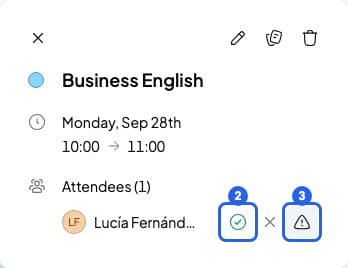 If the session has 4 or more students, you don't see their names. Click the icon of a sheet with a tick, to the right of their photos. The session panel opens on the **Attendance** tab.
## Mark attendance from the course page
1. In **Courses**, open the course.
2. In the **Sessions** tab, click the person icon (**Open session details**) on the session.
If the session has 4 or more students, you don't see their names. Click the icon of a sheet with a tick, to the right of their photos. The session panel opens on the **Attendance** tab.
## Mark attendance from the course page
1. In **Courses**, open the course.
2. In the **Sessions** tab, click the person icon (**Open session details**) on the session.
 3. The session panel opens on the **Attendance** tab.
4. Click each student's status. It saves straight away.
3. The session panel opens on the **Attendance** tab.
4. Click each student's status. It saves straight away.
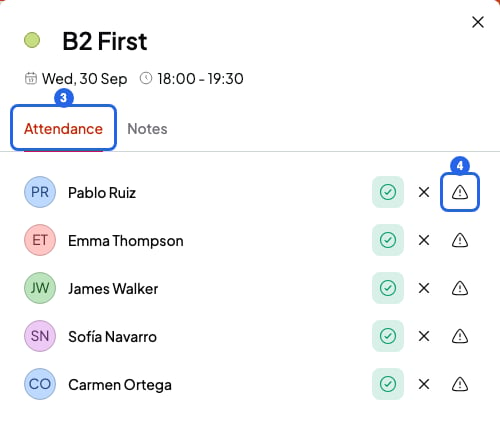 You can mark attendance before the session. For example, if your student tells you they'll miss it.
## What each status changes
* **Present**: the session counts as done. If your student has a pack, it uses one session of the pack when the session starts, not before.
* **Absent**: your student missed it without telling you. It doesn't use a pack session. If the course charges **Per hour**, you can still charge for the session.
* **Absent with notice**: your student told you they couldn't come. It doesn't use a pack session. If the course charges **Per hour**, you can't add the session to a bill.
* If the course charges **Per month**, attendance doesn't change what you charge.
Your student sees their attendance in the student portal, on their past sessions: **You attended**, **You missed it** or **You gave notice**.
## What you can't do
* You can't leave a student without a status. If you don't change it, it counts as **Present** and uses a session of their pack.
* SmartCookie doesn't tell your student when you change their attendance.
## Related articles
* [Track or remove a student's pack](/en/payments/manage-packs)
* [Send a bill to a student](/en/payments/send-a-bill)
* [Add a session](/en/calendar/add-a-session)
* [What your students see in the portal](/en/student-portal/what-students-see)
You can mark attendance before the session. For example, if your student tells you they'll miss it.
## What each status changes
* **Present**: the session counts as done. If your student has a pack, it uses one session of the pack when the session starts, not before.
* **Absent**: your student missed it without telling you. It doesn't use a pack session. If the course charges **Per hour**, you can still charge for the session.
* **Absent with notice**: your student told you they couldn't come. It doesn't use a pack session. If the course charges **Per hour**, you can't add the session to a bill.
* If the course charges **Per month**, attendance doesn't change what you charge.
Your student sees their attendance in the student portal, on their past sessions: **You attended**, **You missed it** or **You gave notice**.
## What you can't do
* You can't leave a student without a status. If you don't change it, it counts as **Present** and uses a session of their pack.
* SmartCookie doesn't tell your student when you change their attendance.
## Related articles
* [Track or remove a student's pack](/en/payments/manage-packs)
* [Send a bill to a student](/en/payments/send-a-bill)
* [Add a session](/en/calendar/add-a-session)
* [What your students see in the portal](/en/student-portal/what-students-see)