> ## Documentation Index
> Fetch the complete documentation index at: https://docs.smartcookieapp.com/llms.txt
> Use this file to discover all available pages before exploring further.
> ## Agent Instructions
> This is the SmartCookie help center for teachers and their students. Answer in the reader's language (Spanish pages have no prefix, English pages start with /en). Only describe features documented here; if something is not documented, say you don't know and point to /contact-support.
# Contact support
> Write to us from SmartCookie, by email or on WhatsApp. Here are our hours, reply times and the support form limits.
 Got a question, or something isn't working? Write to us through the SmartCookie form, by email or on WhatsApp. If it's urgent, WhatsApp is the fastest.
## Hours and reply times
* **WhatsApp** ([+34 611 151 527](https://wa.me/34611151527)): usually right away, Monday to Friday, 08:00 to 18:00 (Spain time).
* **Email** ([info@smartcookieapp.com](mailto:info@smartcookieapp.com)): usually within 12 hours.
* **Form in SmartCookie**: usually within 12 hours. See below for how to use it.
On weekends and outside these hours, all channels may take a little longer.
## Send a message from SmartCookie
1. [Log in to SmartCookie](https://www.smartcookieapp.com/en/login).
2. Click your profile picture (or your initials), top right.
3. Select **Help & support**.
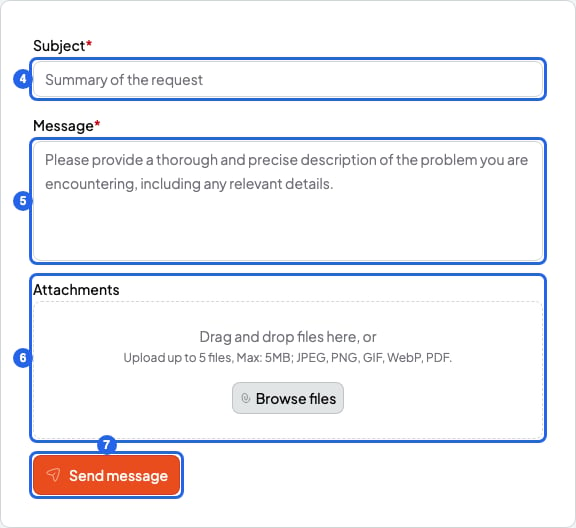
4. Fill in the **Subject**.
5. Fill in the **Message**.
6. If you like, add screenshots or PDFs under **Attachments**.
7. Click **Send message**. You'll see **Message sent!** and we'll reply to the email you use to log in.
Got a question, or something isn't working? Write to us through the SmartCookie form, by email or on WhatsApp. If it's urgent, WhatsApp is the fastest.
## Hours and reply times
* **WhatsApp** ([+34 611 151 527](https://wa.me/34611151527)): usually right away, Monday to Friday, 08:00 to 18:00 (Spain time).
* **Email** ([info@smartcookieapp.com](mailto:info@smartcookieapp.com)): usually within 12 hours.
* **Form in SmartCookie**: usually within 12 hours. See below for how to use it.
On weekends and outside these hours, all channels may take a little longer.
## Send a message from SmartCookie
1. [Log in to SmartCookie](https://www.smartcookieapp.com/en/login).
2. Click your profile picture (or your initials), top right.
3. Select **Help & support**.
4. Fill in the **Subject**.
5. Fill in the **Message**.
6. If you like, add screenshots or PDFs under **Attachments**.
7. Click **Send message**. You'll see **Message sent!** and we'll reply to the email you use to log in.
 ## Form limits
| What | Limit |
| - | - |
| Subject | 200 characters |
| Message | 5000 characters (about 800 words) |
| Attachments | 5 files per message |
| Size of each file | 5 MB (a screenshot or a phone photo usually fits) |
| File types | Images (JPEG, PNG, GIF, WebP) and PDFs |
## What to tell us
To help you faster, tell us:
* What you did, step by step.
* What you expected to happen.
* What happened instead.
* A screenshot of what you see (a phone photo of your screen works too).
## If you're a student
Your teacher manages your sessions, bookings and payments in SmartCookie. Write to your teacher first: they can change a session or check a payment.
## If the form doesn't work for you
* You need to be logged in to use the form. If you can't get into your account, write to us by email or on WhatsApp.
* You can send up to 5 messages per hour from the form. If you need to write again, use email or WhatsApp.
## Form limits
| What | Limit |
| - | - |
| Subject | 200 characters |
| Message | 5000 characters (about 800 words) |
| Attachments | 5 files per message |
| Size of each file | 5 MB (a screenshot or a phone photo usually fits) |
| File types | Images (JPEG, PNG, GIF, WebP) and PDFs |
## What to tell us
To help you faster, tell us:
* What you did, step by step.
* What you expected to happen.
* What happened instead.
* A screenshot of what you see (a phone photo of your screen works too).
## If you're a student
Your teacher manages your sessions, bookings and payments in SmartCookie. Write to your teacher first: they can change a session or check a payment.
## If the form doesn't work for you
* You need to be logged in to use the form. If you can't get into your account, write to us by email or on WhatsApp.
* You can send up to 5 messages per hour from the form. If you need to write again, use email or WhatsApp.