> ## Documentation Index
> Fetch the complete documentation index at: https://docs.smartcookieapp.com/llms.txt
> Use this file to discover all available pages before exploring further.
> ## Agent Instructions
> This is the SmartCookie help center for teachers and their students. Answer in the reader's language (Spanish pages have no prefix, English pages start with /en). Only describe features documented here; if something is not documented, say you don't know and point to /contact-support.
# Which course type to choose
> Compare the 4 SmartCookie course types: who joins each one, who can book, and when to use it.
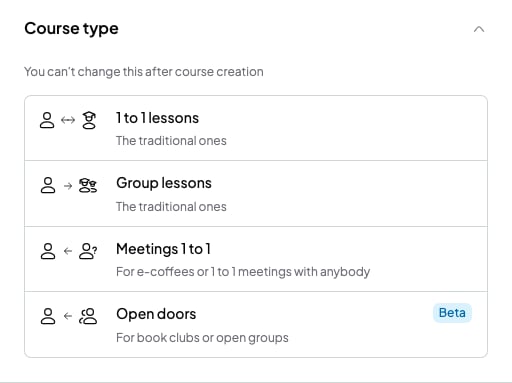
The course type decides who joins the course and who can book its sessions. You choose it when you create the course and you can't change it later, so it's worth a minute of thought.
## The 4 types at a glance
| Course type | Who books |
| - | - |
| **1 to 1 lessons** | Your student, from your booking link (on when you create the course). |
| **Group lessons** | Nobody: you schedule every session. |
| **Meetings 1 to 1** | Anyone, from your booking link. |
| **Open doors** | Anyone, in the group sessions you schedule. |
Your booking link is your public page where people pick a day and time to book. We explain it in [Share or change your link](/en/booking/your-link).
 ## 1 to 1 lessons
For your usual sessions with a single student. For example, "B2 English with Lucía".
* The course has a single student.
* You add the sessions to your calendar.
* Online booking is on from the start. So your student can also book sessions in the free slots of your availability, from your booking link.
* To book, your student types their email. It must be the same email you saved in SmartCookie.
* If they type a different email, SmartCookie doesn't find the course and they can't book.
## Group lessons
For fixed groups, with the same students every week. For example, "Tuesday B1 conversation".
* You add the students to the group.
* You schedule the sessions. Each session includes every student in the course.
* Nobody books online in this course type.
## Meetings 1 to 1
For one-off sessions with anyone, like a trial session or a get-to-know-you coffee. For example, "Free trial session".
* Anyone books a slot of your availability from your booking link. They don't need an account.
* You don't add sessions or students: each booking creates its own session.
* Whoever books shows up in your **Students** list, with their name and email.
## Open doors
For open groups, where each session can have different people. For example, a book club. It's marked **Beta**: it's new and we're still improving it.
* You schedule the group sessions and set how many places each one has, in **Max participants**.
* Anyone books a place from your booking link, until the session is full.
* You don't add students: whoever books shows up in your **Students** list.
## How to choose
* Are your sessions always with the same person? Choose **1 to 1 lessons**.
* Do you have a fixed group of students? Choose **Group lessons**.
* Do you want new people to book a slot with you? Choose **Meetings 1 to 1**.
* Do you run a group open to anyone who wants to come? Choose **Open doors**.
## What you can't do
* You can't change a course's type. If you pick the wrong one, create a new course with the right type.
* You can't have more than one student in **1 to 1 lessons**. For several students, use **Group lessons**.
* You can't turn on online booking in **Group lessons**.
* You can't add students by hand in **Meetings 1 to 1** or **Open doors**. They join when they book.
## Related articles
* [Create a course](/en/courses/create-a-course)
* [Let students book sessions](/en/booking/turn-on-booking)
* [Set your availability](/en/booking/set-availability)
* [How SmartCookie is organized: courses, students and sessions](/en/getting-started/how-smartcookie-works)
## 1 to 1 lessons
For your usual sessions with a single student. For example, "B2 English with Lucía".
* The course has a single student.
* You add the sessions to your calendar.
* Online booking is on from the start. So your student can also book sessions in the free slots of your availability, from your booking link.
* To book, your student types their email. It must be the same email you saved in SmartCookie.
* If they type a different email, SmartCookie doesn't find the course and they can't book.
## Group lessons
For fixed groups, with the same students every week. For example, "Tuesday B1 conversation".
* You add the students to the group.
* You schedule the sessions. Each session includes every student in the course.
* Nobody books online in this course type.
## Meetings 1 to 1
For one-off sessions with anyone, like a trial session or a get-to-know-you coffee. For example, "Free trial session".
* Anyone books a slot of your availability from your booking link. They don't need an account.
* You don't add sessions or students: each booking creates its own session.
* Whoever books shows up in your **Students** list, with their name and email.
## Open doors
For open groups, where each session can have different people. For example, a book club. It's marked **Beta**: it's new and we're still improving it.
* You schedule the group sessions and set how many places each one has, in **Max participants**.
* Anyone books a place from your booking link, until the session is full.
* You don't add students: whoever books shows up in your **Students** list.
## How to choose
* Are your sessions always with the same person? Choose **1 to 1 lessons**.
* Do you have a fixed group of students? Choose **Group lessons**.
* Do you want new people to book a slot with you? Choose **Meetings 1 to 1**.
* Do you run a group open to anyone who wants to come? Choose **Open doors**.
## What you can't do
* You can't change a course's type. If you pick the wrong one, create a new course with the right type.
* You can't have more than one student in **1 to 1 lessons**. For several students, use **Group lessons**.
* You can't turn on online booking in **Group lessons**.
* You can't add students by hand in **Meetings 1 to 1** or **Open doors**. They join when they book.
## Related articles
* [Create a course](/en/courses/create-a-course)
* [Let students book sessions](/en/booking/turn-on-booking)
* [Set your availability](/en/booking/set-availability)
* [How SmartCookie is organized: courses, students and sessions](/en/getting-started/how-smartcookie-works)