> ## Documentation Index
> Fetch the complete documentation index at: https://docs.smartcookieapp.com/llms.txt
> Use this file to discover all available pages before exploring further.
> ## Agent Instructions
> This is the SmartCookie help center for teachers and their students. Answer in the reader's language (Spanish pages have no prefix, English pages start with /en). Only describe features documented here; if something is not documented, say you don't know and point to /contact-support.
# Create a course
> Create a course in SmartCookie: name it, choose its type, add its students and, if you like, its price.
To create a course you only need a name and a type. Students, price and the other details are optional, and you can add them now or later.
## Before you start
* Decide on the course type, because you can't change it later. If you're not sure, read [Which course type to choose](/en/courses/course-types).
## Create the course
1. In the menu on the left, click **Courses**.
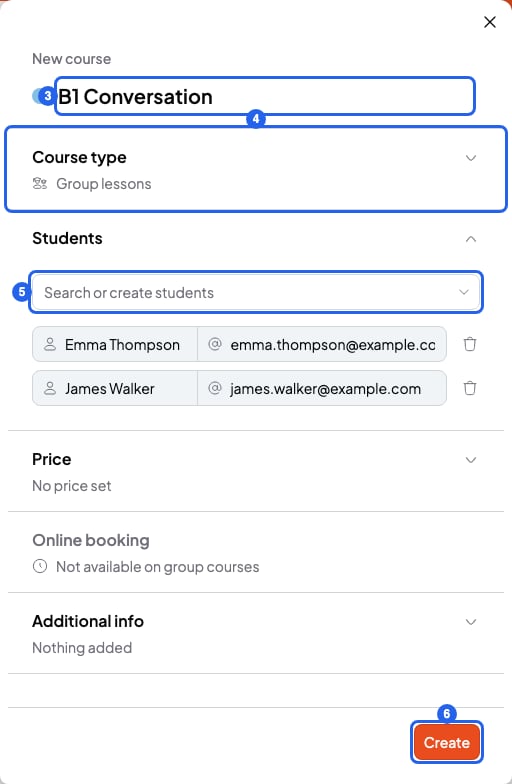
2. Click **New course**, at the top right. The **New course** panel opens.
3. Type the course name where it says **My course**. For another color, click the color circle to the left of the name.
4. In **Course type**, choose one of the 4 types.
5. In **Students**, type a student's name and click it to add them. Repeat to add more. In **1 to 1 lessons** you can only add one. In **Meetings 1 to 1** and **Open doors**, skip this step.
6. Click **Create**. You'll see "Course created successfully" and your course page opens.
 Is your student not in SmartCookie yet? In step 5, type their name and choose **Add "…" as a new student**. They show up in the list with the **New** label. If you like, type their email in **Email (optional)**, next to their name.
You can also create the course with no students and add them later on the course page, with **Add student**.
## Fill in the rest (optional)
The panel has three more sections. You can leave them empty:
* **Price**: what you charge, **Per hour** or **Per month**. In **Group lessons** it's always per month. SmartCookie uses this price when you prepare a bill.
* **Online booking**: whether your students can book sessions from your booking link. In **1 to 1 lessons** it's on from the start. We explain it in [Let students book sessions](/en/booking/turn-on-booking).
* **Additional info**: a **Description** (up to 500 characters), the **Level** (up to 20) and the **Schedule** (up to 100), for example "Mondays and Wednesdays".
## Change a course
1. In **Courses**, open the course.
2. Click the pencil (**Edit course**), at the top right.
Is your student not in SmartCookie yet? In step 5, type their name and choose **Add "…" as a new student**. They show up in the list with the **New** label. If you like, type their email in **Email (optional)**, next to their name.
You can also create the course with no students and add them later on the course page, with **Add student**.
## Fill in the rest (optional)
The panel has three more sections. You can leave them empty:
* **Price**: what you charge, **Per hour** or **Per month**. In **Group lessons** it's always per month. SmartCookie uses this price when you prepare a bill.
* **Online booking**: whether your students can book sessions from your booking link. In **1 to 1 lessons** it's on from the start. We explain it in [Let students book sessions](/en/booking/turn-on-booking).
* **Additional info**: a **Description** (up to 500 characters), the **Level** (up to 20) and the **Schedule** (up to 100), for example "Mondays and Wednesdays".
## Change a course
1. In **Courses**, open the course.
2. Click the pencil (**Edit course**), at the top right.
 3. Change what you need. If you change the price, pick the day the new price starts in **Apply changes from**.
4. Click **Save changes**.
You can change everything except the course type.
## Delete a course
1. In **Courses**, open the course.
2. Click the bin (**Delete course**), at the top right, next to the pencil.
3. In the window, click **Delete course**. You'll see "Course deleted successfully".
## What you can't do
* You can't change a course's type. Create a new course with the right type.
* You can't use a name longer than 50 characters.
* You can't get back a deleted course. Deleting it removes its sessions and notes. Your students stay in **Students**.
## Related articles
* [Which course type to choose](/en/courses/course-types)
* [Add a session](/en/calendar/add-a-session)
* [Add or import students](/en/students/add-students)
* [Send a bill to a student](/en/payments/send-a-bill)
3. Change what you need. If you change the price, pick the day the new price starts in **Apply changes from**.
4. Click **Save changes**.
You can change everything except the course type.
## Delete a course
1. In **Courses**, open the course.
2. Click the bin (**Delete course**), at the top right, next to the pencil.
3. In the window, click **Delete course**. You'll see "Course deleted successfully".
## What you can't do
* You can't change a course's type. Create a new course with the right type.
* You can't use a name longer than 50 characters.
* You can't get back a deleted course. Deleting it removes its sessions and notes. Your students stay in **Students**.
## Related articles
* [Which course type to choose](/en/courses/course-types)
* [Add a session](/en/calendar/add-a-session)
* [Add or import students](/en/students/add-students)
* [Send a bill to a student](/en/payments/send-a-bill)