> ## Documentation Index
> Fetch the complete documentation index at: https://docs.smartcookieapp.com/llms.txt
> Use this file to discover all available pages before exploring further.
> ## Agent Instructions
> This is the SmartCookie help center for teachers and their students. Answer in the reader's language (Spanish pages have no prefix, English pages start with /en). Only describe features documented here; if something is not documented, say you don't know and point to /contact-support.
# How SmartCookie is organized: courses, students and sessions
> Understand the building blocks of SmartCookie (courses, students, sessions and events) and the order to create them in.
In SmartCookie everything revolves around courses: each course has its own students and sessions. Once you see how these pieces fit together, the rest of the app is much easier.
## What each thing is
* **Course**: a group of sessions with the same students. For example, "B2 English with Anna" or "Thursday book club".
* **Student**: a person you teach. They can be in one course or in several.
* **Session**: each class you teach, with its date and time. Every session always belongs to a course.
* **Event**: something in your schedule that isn't a session, like a doctor's appointment or time to prepare materials. It doesn't belong to any course and has no students.
## How the pieces fit together
The usual order is: create a course, add its students, then schedule its sessions. We walk you through each step in [Create a course](/en/courses/create-a-course), [Add or import students](/en/students/add-students) and [Add a session](/en/calendar/add-a-session).
Your sessions and your events show up together in your calendar.
## The 4 course types
When you create a course, you choose its type: **1 to 1 lessons**, **Group lessons**, **Meetings 1 to 1** or **Open doors**. The type decides who joins the course and who can book sessions. Compare the 4 types in [Which course type to choose](/en/courses/course-types).
To book, people use your booking link: your own page where they pick a day and time. We explain it in [Share or change your link](/en/booking/your-link).
In **1 to 1 lessons** and **Group lessons** courses, you need at least one student before you add sessions. If you import from Google Calendar, a course can arrive with sessions but no students.
## Where everything is
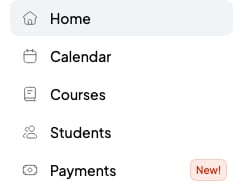
The menu on the left takes you to each part of SmartCookie:
* **Home**: a summary of your day, with your next session and your agenda.
* **Calendar**: all your sessions and events.
* **Courses**: your courses, with their students, sessions and notes.
* **Students**: the list of everyone you teach.
* **Payments**: the bills you send to your students.
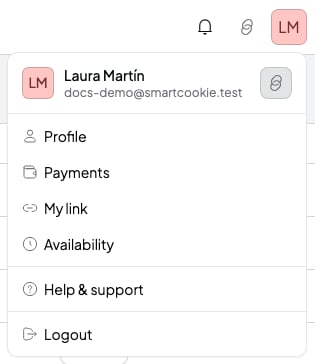
 At the top right, your photo or initials open your profile menu. Your settings live there:
* **Profile**: your details, language, time zone, membership, integrations (like Google Calendar) and reminders.
* **Payments**: your billing details and your Stripe connection (Stripe handles card payments). It's a different page from **Payments** in the menu on the left.
* **My link**: your booking link and your student portal.
* **Availability**: the hours when your students can book.
* **Help & support**: write to us if you need help.
At the top right, your photo or initials open your profile menu. Your settings live there:
* **Profile**: your details, language, time zone, membership, integrations (like Google Calendar) and reminders.
* **Payments**: your billing details and your Stripe connection (Stripe handles card payments). It's a different page from **Payments** in the menu on the left.
* **My link**: your booking link and your student portal.
* **Availability**: the hours when your students can book.
* **Help & support**: write to us if you need help.
 ## Your free trial
When you create your account, you get 14 days free to try all of SmartCookie. You don't need a card.
When the trial ends, you need a membership to keep using SmartCookie. Your data stays saved: once you subscribe, you pick up where you left off. Prices and details are in [Free trial and SmartCookie membership](/en/account/trial-and-plans).
## Related articles
* [Which course type to choose](/en/courses/course-types)
* [Create a course](/en/courses/create-a-course)
* [Add or import students](/en/students/add-students)
* [Import your sessions from Google Calendar](/en/getting-started/import-from-google-calendar)
## Your free trial
When you create your account, you get 14 days free to try all of SmartCookie. You don't need a card.
When the trial ends, you need a membership to keep using SmartCookie. Your data stays saved: once you subscribe, you pick up where you left off. Prices and details are in [Free trial and SmartCookie membership](/en/account/trial-and-plans).
## Related articles
* [Which course type to choose](/en/courses/course-types)
* [Create a course](/en/courses/create-a-course)
* [Add or import students](/en/students/add-students)
* [Import your sessions from Google Calendar](/en/getting-started/import-from-google-calendar)