> ## Documentation Index
> Fetch the complete documentation index at: https://docs.smartcookieapp.com/llms.txt
> Use this file to discover all available pages before exploring further.
> ## Agent Instructions
> This is the SmartCookie help center for teachers and their students. Answer in the reader's language (Spanish pages have no prefix, English pages start with /en). Only describe features documented here; if something is not documented, say you don't know and point to /contact-support.
# Fill in your billing details
> Add your name, your email and how students pay you, so you can send bills.
Your billing details are the information shown on every bill you send: who is charging and how to pay you. Without your legal name and a contact email, SmartCookie won't let you create bills.
## Fill in the required details
1. At the top right, click your profile picture (or your initials).
2. In that menu, click **Payments** (not the **Payments** page in the left menu). The **Payment setup** page opens.
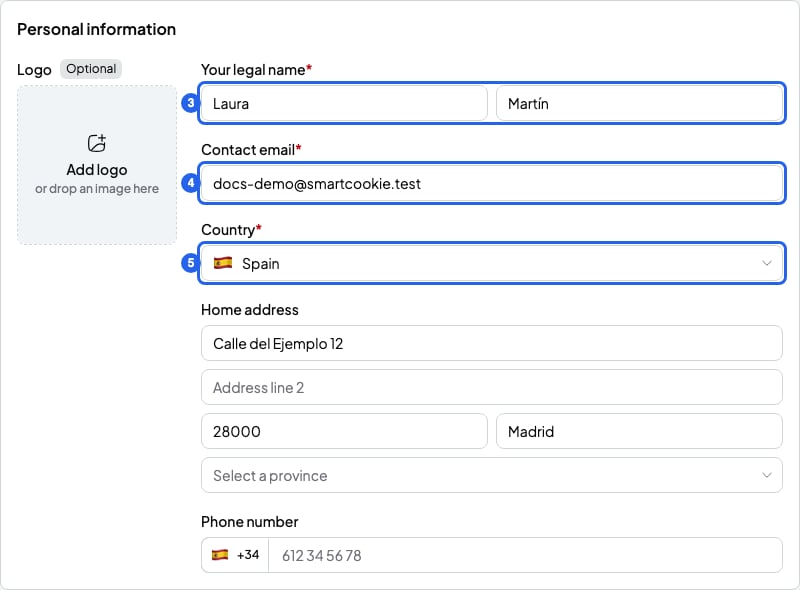
3. Under **Your legal name**, type your **Legal first name** and **Last name(s)**, as they appear on your ID.
4. In **Contact email**, type the email where students can reach you.
5. In **Country**, choose the country where you live and get paid.
6. Scroll to the bottom and click **Save**. You'll see "Billing details saved."
 ## Add the optional details
These details aren't required, but they help students pay you. Add at least one way to pay (IBAN, other methods or Stripe). Otherwise, your student won't know how to pay you.
* **Logo**: a PNG or JPG image up to 12 MB. It shows at the top of your bills.
* **Home address** and **Phone number**: write the phone with the country code, for example `+44`.
* **VAT rate**: from 0% to 100%. VAT is added on top of each bill's total. Leave it at 0% if you don't charge VAT. If you're not sure whether to charge VAT, ask your accountant. You can also change it on a single bill: [Add a discount or VAT to a bill](/en/payments/discounts-and-vat).
* **Billing currency**: the currency you charge in. It's set to euros at first. If you connect Stripe before creating your first bill, it becomes your Stripe account's currency.
* **IBAN** and **Confirm IBAN**: your bank account, so students can pay by bank transfer. Type it the same way twice.
* **Other payment methods**: any other way to pay you, like a Bizum number or "cash at the session". Up to 1,000 characters.
Students see your IBAN and your other payment methods on every bill. If you also want them to pay by card, connect Stripe (the online payment service SmartCookie uses).
## What you can't do
* You can't change your **Billing currency** once you've created a bill or connected Stripe. Choose it carefully before you start.
* You can't change your **Country** after connecting Stripe. You'll see "Set by your Stripe account."
* If you change your details, bills you already sent don't change. Only new bills use the new details.
## Related articles
* [Send a bill to a student](/en/payments/send-a-bill)
* [Take card payments: connect Stripe](/en/payments/connect-stripe)
## Add the optional details
These details aren't required, but they help students pay you. Add at least one way to pay (IBAN, other methods or Stripe). Otherwise, your student won't know how to pay you.
* **Logo**: a PNG or JPG image up to 12 MB. It shows at the top of your bills.
* **Home address** and **Phone number**: write the phone with the country code, for example `+44`.
* **VAT rate**: from 0% to 100%. VAT is added on top of each bill's total. Leave it at 0% if you don't charge VAT. If you're not sure whether to charge VAT, ask your accountant. You can also change it on a single bill: [Add a discount or VAT to a bill](/en/payments/discounts-and-vat).
* **Billing currency**: the currency you charge in. It's set to euros at first. If you connect Stripe before creating your first bill, it becomes your Stripe account's currency.
* **IBAN** and **Confirm IBAN**: your bank account, so students can pay by bank transfer. Type it the same way twice.
* **Other payment methods**: any other way to pay you, like a Bizum number or "cash at the session". Up to 1,000 characters.
Students see your IBAN and your other payment methods on every bill. If you also want them to pay by card, connect Stripe (the online payment service SmartCookie uses).
## What you can't do
* You can't change your **Billing currency** once you've created a bill or connected Stripe. Choose it carefully before you start.
* You can't change your **Country** after connecting Stripe. You'll see "Set by your Stripe account."
* If you change your details, bills you already sent don't change. Only new bills use the new details.
## Related articles
* [Send a bill to a student](/en/payments/send-a-bill)
* [Take card payments: connect Stripe](/en/payments/connect-stripe)