> ## Documentation Index
> Fetch the complete documentation index at: https://docs.smartcookieapp.com/llms.txt
> Use this file to discover all available pages before exploring further.
> ## Agent Instructions
> This is the SmartCookie help center for teachers and their students. Answer in the reader's language (Spanish pages have no prefix, English pages start with /en). Only describe features documented here; if something is not documented, say you don't know and point to /contact-support.
# Track or remove a student's pack
> See how many sessions a student has left in their pack, how sessions are counted and how to remove a pack.
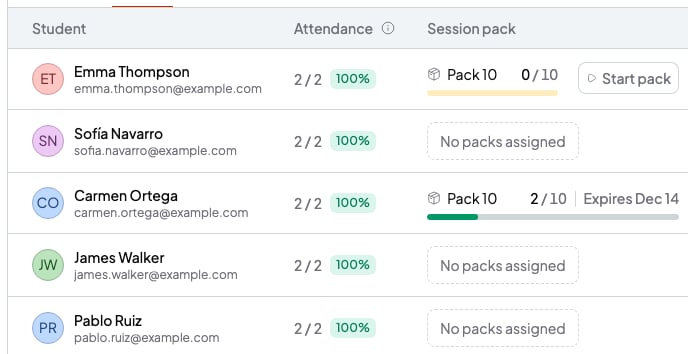
The **Students** tab of each course shows each student's pack: the sessions used and when it expires. You can also remove a pack from there.
## Before you start
* The student needs a pack in that course: [Use session packs](/en/payments/session-packs).
## See how many sessions are left
In the course, open the **Students** tab. The **Session pack** column shows the pack's name, the sessions used (for example, 2 / 10) and when it expires. If a student has no pack, you'll see **No packs assigned**.
 Your student also sees how many sessions they have left in their student portal.
## How sessions are counted
* Every session of that course that has already happened counts, between the pack's start and end dates.
* Canceled sessions don't count, and neither do sessions you mark as **Absent** or **Absent with notice**.
* If you don't mark attendance, the session counts as used. If your student misses a session, mark them **Absent** or **Absent with notice** so it doesn't use up a pack session: [Mark attendance for a session](/en/calendar/attendance).
* The pack ends when all its sessions are used (**Completed**) or when its validity days run out (**Expired**).
## Remove a pack
SmartCookie removes the pack as soon as you click **Remove**, without asking you to confirm. You can't get it back.
1. In the course, open the **Students** tab.
2. Click the three-dot button at the end of the student's row.
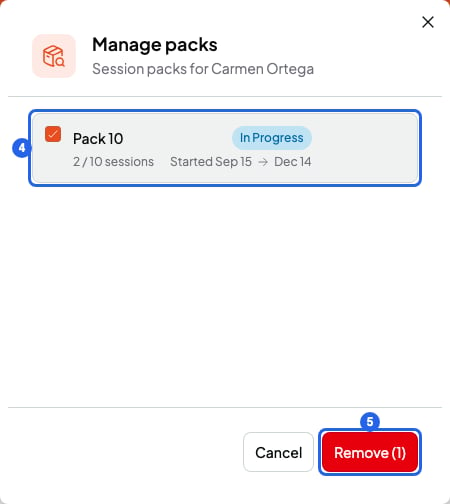
3. Choose **Manage packs**. You'll see all the student's packs in that course, including ones that have ended.
4. Tick the pack you want to remove.
5. Click **Remove (1)**. The pack disappears from the student's row.
Your student also sees how many sessions they have left in their student portal.
## How sessions are counted
* Every session of that course that has already happened counts, between the pack's start and end dates.
* Canceled sessions don't count, and neither do sessions you mark as **Absent** or **Absent with notice**.
* If you don't mark attendance, the session counts as used. If your student misses a session, mark them **Absent** or **Absent with notice** so it doesn't use up a pack session: [Mark attendance for a session](/en/calendar/attendance).
* The pack ends when all its sessions are used (**Completed**) or when its validity days run out (**Expired**).
## Remove a pack
SmartCookie removes the pack as soon as you click **Remove**, without asking you to confirm. You can't get it back.
1. In the course, open the **Students** tab.
2. Click the three-dot button at the end of the student's row.
3. Choose **Manage packs**. You'll see all the student's packs in that course, including ones that have ended.
4. Tick the pack you want to remove.
5. Click **Remove (1)**. The pack disappears from the student's row.
 If the pack was on a bill, the bill doesn't change. If it's unpaid and no longer owed, cancel it: [Mark a bill as paid or cancel it](/en/payments/mark-paid-or-cancel).
## If you gave a pack with the wrong price or sessions
The pack you already gave doesn't change even if you edit the original pack. To fix it:
1. Remove the pack from the student, as in the section above.
2. In the course, click **Packs**.
3. On the pack's card, click the three-dot button and choose **Edit**. Fix the details and click **Update session pack**.
4. Give the pack again and start it: [Use session packs](/en/payments/session-packs).
## What you can't do
* You can't change the start date of a pack you already started. Remove it and give it again.
* You can't undo **Remove**. If you remove a pack by mistake, give it again and start it with the same start date.
## Related articles
* [Use session packs](/en/payments/session-packs)
* [Automatic email reminders](/en/reminders/automatic-reminders)
* [Students: log in to your teacher's portal](/en/for-students/log-in)
If the pack was on a bill, the bill doesn't change. If it's unpaid and no longer owed, cancel it: [Mark a bill as paid or cancel it](/en/payments/mark-paid-or-cancel).
## If you gave a pack with the wrong price or sessions
The pack you already gave doesn't change even if you edit the original pack. To fix it:
1. Remove the pack from the student, as in the section above.
2. In the course, click **Packs**.
3. On the pack's card, click the three-dot button and choose **Edit**. Fix the details and click **Update session pack**.
4. Give the pack again and start it: [Use session packs](/en/payments/session-packs).
## What you can't do
* You can't change the start date of a pack you already started. Remove it and give it again.
* You can't undo **Remove**. If you remove a pack by mistake, give it again and start it with the same start date.
## Related articles
* [Use session packs](/en/payments/session-packs)
* [Automatic email reminders](/en/reminders/automatic-reminders)
* [Students: log in to your teacher's portal](/en/for-students/log-in)