> ## Documentation Index
> Fetch the complete documentation index at: https://docs.smartcookieapp.com/llms.txt
> Use this file to discover all available pages before exploring further.
> ## Agent Instructions
> This is the SmartCookie help center for teachers and their students. Answer in the reader's language (Spanish pages have no prefix, English pages start with /en). Only describe features documented here; if something is not documented, say you don't know and point to /contact-support.
# See what's unbilled, unpaid and paid
> Pick a period on Payments and see how much is unbilled, unpaid and paid, and how it compares with the period before.
At the top of **Payments** you see three totals: **Unbilled**, **Unpaid** and **Paid**. All three count only the period you pick, which is **This month** when you open the page.
## Pick the period
1. In the menu on the left, click **Payments**.
2. At the top right, open the period picker, next to **Summary**. It shows the period picked, for example **This month**. Choose **This month**, **Last month**, **This quarter** or **Last quarter**. The totals change to the period you pick.
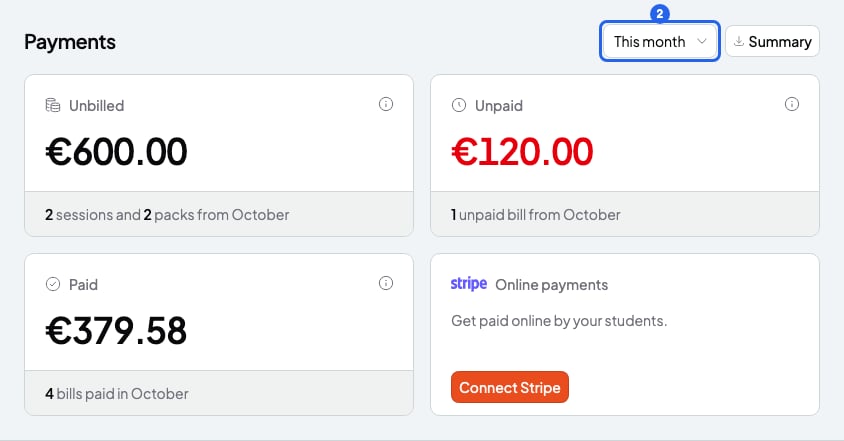 Under each total you see how many sessions, packs or bills are behind it. On a phone, that line doesn't show.
## What each card counts
* **Unbilled**: the sessions and packs in the period that aren't on any bill yet. A session counts on the day it takes place. A pack counts on the day it starts, or today if it has no start date. A course with a **Per month** price counts once a month, at its monthly price.
* **Unpaid**: the bills sent in the period that aren't paid yet, **Overdue** ones included. **Scheduled** bills don't count until the day they're sent. An unpaid bill from an earlier period doesn't show here: pick that period to see it.
* **Paid**: the bills paid in the period, by the day they were paid. It adds up the same as the payments summary PDF.
* The Stripe card doesn't change with the period.
Days are counted in your time zone.
## How paid compares
On **Paid** you see a percentage: how much more or less you got than in the period before.
* If the period isn't over yet, it's compared with the same days of the period before. For example, if today is 7 October, **This month** is compared with 1 to 7 September.
* If you got nothing in the period before, the percentage doesn't show.
* **Unbilled** and **Unpaid** aren't compared with the period before.
## What you can't do
* You can't pick other dates, only the 4 periods. For other dates, download a payments summary PDF.
* You can't see only the period's bills by clicking **Unpaid** or **Paid**. The list shows every bill with that status, from any date. To see the bills paid in the period, download a payments summary PDF.
## Related articles
* [Send a bill to a student](/en/payments/send-a-bill)
* [Mark a bill as paid or cancel it](/en/payments/mark-paid-or-cancel)
* [Download a payments summary for your accountant](/en/payments/payments-summary)
This documentation is built and hosted on [Mintlify](https://mintlify.com), a developer documentation platform.
Under each total you see how many sessions, packs or bills are behind it. On a phone, that line doesn't show.
## What each card counts
* **Unbilled**: the sessions and packs in the period that aren't on any bill yet. A session counts on the day it takes place. A pack counts on the day it starts, or today if it has no start date. A course with a **Per month** price counts once a month, at its monthly price.
* **Unpaid**: the bills sent in the period that aren't paid yet, **Overdue** ones included. **Scheduled** bills don't count until the day they're sent. An unpaid bill from an earlier period doesn't show here: pick that period to see it.
* **Paid**: the bills paid in the period, by the day they were paid. It adds up the same as the payments summary PDF.
* The Stripe card doesn't change with the period.
Days are counted in your time zone.
## How paid compares
On **Paid** you see a percentage: how much more or less you got than in the period before.
* If the period isn't over yet, it's compared with the same days of the period before. For example, if today is 7 October, **This month** is compared with 1 to 7 September.
* If you got nothing in the period before, the percentage doesn't show.
* **Unbilled** and **Unpaid** aren't compared with the period before.
## What you can't do
* You can't pick other dates, only the 4 periods. For other dates, download a payments summary PDF.
* You can't see only the period's bills by clicking **Unpaid** or **Paid**. The list shows every bill with that status, from any date. To see the bills paid in the period, download a payments summary PDF.
## Related articles
* [Send a bill to a student](/en/payments/send-a-bill)
* [Mark a bill as paid or cancel it](/en/payments/mark-paid-or-cancel)
* [Download a payments summary for your accountant](/en/payments/payments-summary)
This documentation is built and hosted on [Mintlify](https://mintlify.com), a developer documentation platform.