> ## Documentation Index
> Fetch the complete documentation index at: https://docs.smartcookieapp.com/llms.txt
> Use this file to discover all available pages before exploring further.
> ## Agent Instructions
> This is the SmartCookie help center for teachers and their students. Answer in the reader's language (Spanish pages have no prefix, English pages start with /en). Only describe features documented here; if something is not documented, say you don't know and point to /contact-support.
# Automatic email reminders
> Turn on automatic emails that remind your students about a payment due or tell them their session pack is running out.
SmartCookie can send automatic emails to your students: to remind them about a payment, or tell them their session pack is running out or expiring. All reminders come turned off; you choose which ones to turn on.
## Before you start
* Your students need their email saved in SmartCookie. Students without an email don't get reminders. See [Add or import students](/en/students/add-students).
* For now, reminders are only sent in English. If your students don't speak it, let them know before you turn them on.
## Turn on your reminders
1. Click your photo or initials, top right, and choose **Profile**.
2. In the left menu, click **Reminders**.
3. In **Payment due soon**, open the dropdown and choose how many days before the due date it's sent.
4. In **Pack almost used up**, choose how many sessions left trigger it.
5. In **Pack expiring soon**, choose how many days before the pack expires it's sent.
6. To turn a reminder off, choose **Disabled** in its dropdown.
Each change saves on its own; there's no save button. A reminder that's on shows its name in black; one that's off shows it in grey, with **Disabled**.
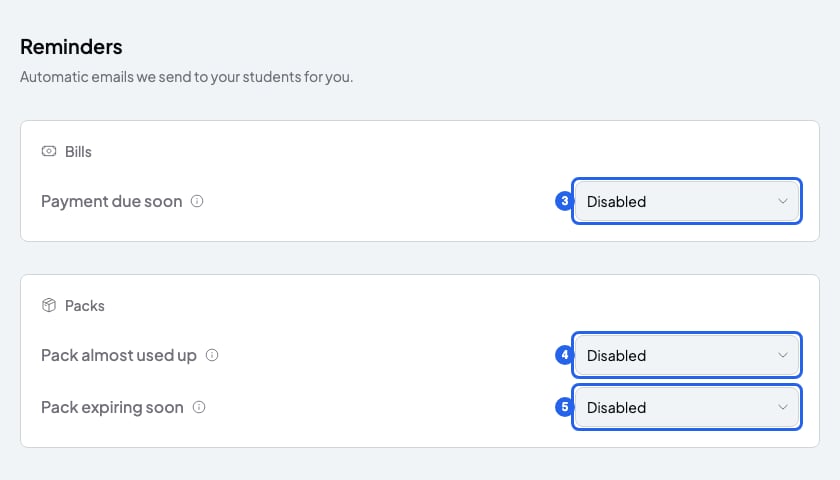 These are the options for each reminder:
| Reminder | When it's sent |
| - | - |
| **Payment due soon** | 1, 2, 3 or 7 days before the due date |
| **Pack almost used up** | When 1, 2, 3 or 5 sessions are left |
| **Pack expiring soon** | 3, 7, 14 or 30 days before it expires |
## When they're sent
* From 9am in your timezone. You can change it in **Profile**, under **Timezone**: [Change your name, email, language, time zone or password](/en/account/account-settings).
* Each reminder is sent only once per bill or per pack.
* **Payment due soon** is only sent if the bill is still unpaid and has a due date. The email includes the link to pay. If the due date is already that close or closer when you send the bill, it isn't sent. For example: with 3 days, a bill due in 2 days doesn't get this reminder.
* **Pack almost used up** is only sent once your student has used at least 1 session from the pack.
* Pack reminders are only sent for packs that haven't expired and still have sessions left.
## What you can't do
* You can't send reminders by WhatsApp or SMS: only by email.
* You can't turn them on for some students only. They apply to everyone with an email.
* You can't send reminders before a session.
## Related articles
* [Send a bill to a student](/en/payments/send-a-bill)
* [Use session packs](/en/payments/session-packs)
* [Add or import students](/en/students/add-students)
These are the options for each reminder:
| Reminder | When it's sent |
| - | - |
| **Payment due soon** | 1, 2, 3 or 7 days before the due date |
| **Pack almost used up** | When 1, 2, 3 or 5 sessions are left |
| **Pack expiring soon** | 3, 7, 14 or 30 days before it expires |
## When they're sent
* From 9am in your timezone. You can change it in **Profile**, under **Timezone**: [Change your name, email, language, time zone or password](/en/account/account-settings).
* Each reminder is sent only once per bill or per pack.
* **Payment due soon** is only sent if the bill is still unpaid and has a due date. The email includes the link to pay. If the due date is already that close or closer when you send the bill, it isn't sent. For example: with 3 days, a bill due in 2 days doesn't get this reminder.
* **Pack almost used up** is only sent once your student has used at least 1 session from the pack.
* Pack reminders are only sent for packs that haven't expired and still have sessions left.
## What you can't do
* You can't send reminders by WhatsApp or SMS: only by email.
* You can't turn them on for some students only. They apply to everyone with an email.
* You can't send reminders before a session.
## Related articles
* [Send a bill to a student](/en/payments/send-a-bill)
* [Use session packs](/en/payments/session-packs)
* [Add or import students](/en/students/add-students)