> ## Documentation Index
> Fetch the complete documentation index at: https://docs.smartcookieapp.com/llms.txt
> Use this file to discover all available pages before exploring further.
> ## Agent Instructions
> This is the SmartCookie help center for teachers and their students. Answer in the reader's language (Spanish pages have no prefix, English pages start with /en). Only describe features documented here; if something is not documented, say you don't know and point to /contact-support.
# Invite students to the portal
> Send your students an invitation so they can log in to their portal and see their sessions, packs and payments.
Invite a student from your **Students** list and they'll get an email to create a password and log in to your student portal. The student portal is each student's private page, with their sessions, their session packs and your bills.
## Before you start
* The student needs an email saved in SmartCookie. If they don't have one, add it: [Add or import students](/en/students/add-students).
* Your portal needs a web address (your link). It's the same as your booking link, without `/book` at the end.
* If you haven't chosen it yet, SmartCookie warns you with "Set up your portal address first". Choose it in [Share or change your link](/en/booking/your-link).
## Invite a student
1. In the menu on the left, click **Students**.
2. In the student's row, in the **Portal access** column, click **Invite**.
3. You'll see the message "Invitation sent". The **Portal access** column will show **Invitation sent**.
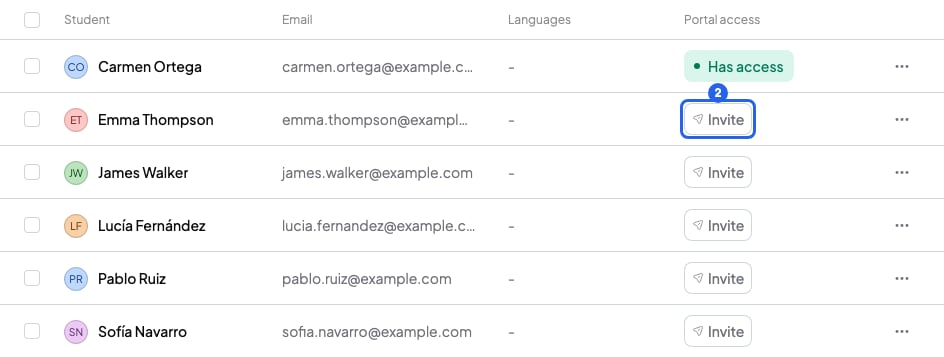 You can also click the three-dot button at the end of their row, then **Invite to portal**.
## Invite several students at once
1. In **Students**, tick the box of each student you want to invite.
2. In the bar that appears at the bottom, click **Invite / Resend**.
You can also click the three-dot button at the end of their row, then **Invite to portal**.
## Invite several students at once
1. In **Students**, tick the box of each student you want to invite.
2. In the bar that appears at the bottom, click **Invite / Resend**.
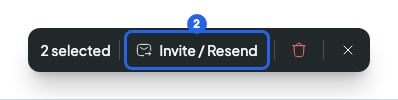 3. Click **Invite / Resend** again to confirm. SmartCookie tells you how many invitations it sent and who it couldn't invite.
## What happens after you invite
* Your student gets an email from SmartCookie with the **Create password** button. Once they create it, the **Portal access** column shows **Has access**.
* The invitation expires after 14 days. The column then goes back to **No access** and you can invite them again.
* Can't they find the email? Ask them to check their spam folder. If it's still not there, click the three-dot button in their row, then **Resend invitation**. The previous link stops working.
* The email arrives in the language you have set in SmartCookie when you send it. If your student speaks another language, change it before inviting them: in **Profile**, **Language** card.
* To explain how to log in, send them [Students: log in to your teacher's portal](/en/for-students/log-in).
In their portal, your student sees their sessions, their attendance, their packs, your bills and the notes you share with them. They never see your private notes: [What your students see in the portal](/en/student-portal/what-students-see).
## Remove portal access
1. In **Students**, click the three-dot button at the end of the student's row.
2. Click **Revoke portal access**.
3. Click **Revoke access**. You'll see "Portal access revoked" and your student can no longer log in. You can invite them again whenever you want.
Removing access doesn't delete their sessions, their packs, your bills or your notes.
Has your student forgotten their password? They can't reset it in the portal. Remove their access and invite them again: they'll get an email to create a new one.
## What you can't do
* You can't invite a student without an email. Add their email first.
* Your students can't sign up to your portal on their own. They only get in with your invitation.
* If the student's email already has a SmartCookie account (for example, in another teacher's portal), they can't accept your invitation. Ask them for another email. Click their row in **Students**, change their **Email** and invite them again.
* If you delete a student, their portal access is deleted too: [Delete a student](/en/students/delete-a-student).
## Related articles
* [What your students see in the portal](/en/student-portal/what-students-see)
* [Students: log in to your teacher's portal](/en/for-students/log-in)
* [Share or change your link](/en/booking/your-link)
* [Add or import students](/en/students/add-students)
3. Click **Invite / Resend** again to confirm. SmartCookie tells you how many invitations it sent and who it couldn't invite.
## What happens after you invite
* Your student gets an email from SmartCookie with the **Create password** button. Once they create it, the **Portal access** column shows **Has access**.
* The invitation expires after 14 days. The column then goes back to **No access** and you can invite them again.
* Can't they find the email? Ask them to check their spam folder. If it's still not there, click the three-dot button in their row, then **Resend invitation**. The previous link stops working.
* The email arrives in the language you have set in SmartCookie when you send it. If your student speaks another language, change it before inviting them: in **Profile**, **Language** card.
* To explain how to log in, send them [Students: log in to your teacher's portal](/en/for-students/log-in).
In their portal, your student sees their sessions, their attendance, their packs, your bills and the notes you share with them. They never see your private notes: [What your students see in the portal](/en/student-portal/what-students-see).
## Remove portal access
1. In **Students**, click the three-dot button at the end of the student's row.
2. Click **Revoke portal access**.
3. Click **Revoke access**. You'll see "Portal access revoked" and your student can no longer log in. You can invite them again whenever you want.
Removing access doesn't delete their sessions, their packs, your bills or your notes.
Has your student forgotten their password? They can't reset it in the portal. Remove their access and invite them again: they'll get an email to create a new one.
## What you can't do
* You can't invite a student without an email. Add their email first.
* Your students can't sign up to your portal on their own. They only get in with your invitation.
* If the student's email already has a SmartCookie account (for example, in another teacher's portal), they can't accept your invitation. Ask them for another email. Click their row in **Students**, change their **Email** and invite them again.
* If you delete a student, their portal access is deleted too: [Delete a student](/en/students/delete-a-student).
## Related articles
* [What your students see in the portal](/en/student-portal/what-students-see)
* [Students: log in to your teacher's portal](/en/for-students/log-in)
* [Share or change your link](/en/booking/your-link)
* [Add or import students](/en/students/add-students)