> ## Documentation Index
> Fetch the complete documentation index at: https://docs.smartcookieapp.com/llms.txt
> Use this file to discover all available pages before exploring further.
> ## Agent Instructions
> This is the SmartCookie help center for teachers and their students. Answer in the reader's language (Spanish pages have no prefix, English pages start with /en). Only describe features documented here; if something is not documented, say you don't know and point to /contact-support.
# What your students see in the portal
> See what each student sees in their portal: their sessions, their attendance, the notes you share, their packs and your bills.
Each student only sees their own things: their sessions, their attendance, the notes you share on their sessions, their packs and your bills. They never see other students or your private notes.
## What the student portal is
It's each student's private page with you. The menu on the left shows your photo (or initials) and two pages: **Classes** (the calendar icon) and **Bills** (the page icon). At the top is the **Book a class** button, which opens your booking link with their details already filled in.
Your student logs in with the invitation you send them: [Invite students to the portal](/en/student-portal/invite-students).
## What they see on the Classes page
It's the first thing they see when they log in. At the top there are three figures. On a small screen, the last two are under **Details**.
* **Next class**: the day and time of their next session. If it's online, with the **Join the class** button.
* **Classes taken**: how many of their sessions have already happened, out of the total.
* **Attendance**: the percentage of sessions they came to.
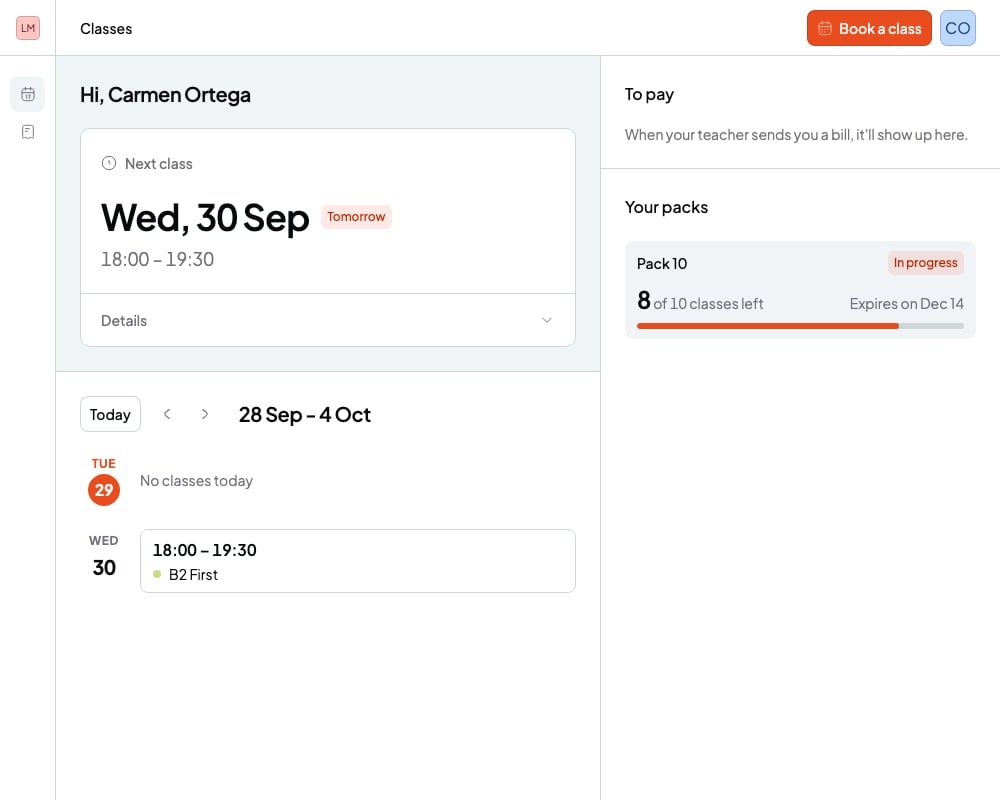 Below, they see their sessions week by week, with the time and the course name. They can go to previous and next weeks.
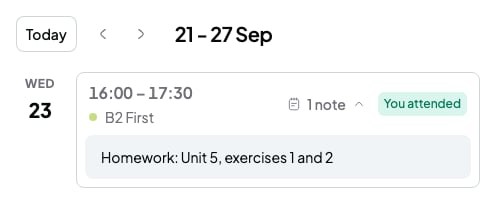
* On past sessions they see their attendance: **You attended**, **You missed it** or **You gave notice**. To mark it, read [Mark attendance for a session](/en/calendar/attendance).
* On upcoming online sessions they see the **Join** button.
* If a session has shared notes, they see how many and can open them.
Below, they see their sessions week by week, with the time and the course name. They can go to previous and next weeks.
* On past sessions they see their attendance: **You attended**, **You missed it** or **You gave notice**. To mark it, read [Mark attendance for a session](/en/calendar/attendance).
* On upcoming online sessions they see the **Join** button.
* If a session has shared notes, they see how many and can open them.
 Next to it, or below on small screens, there are two more sections:
* **To pay**: your pending bills, with their amount, their due date and the **View bill** button. Paid ones are hidden, but they can show them.
* **Your packs**: each pack with the sessions left and when it expires. With 30 days or fewer to go, they see the days left.
## What they see on the Bills page
**Bills** holds your bills. At the top they see how much they owe you in total (**Outstanding**) and how many they've paid (**Settled**). Below is a table with all of them: reference, date, due date, status and amount. **View bill** opens the bill so they can pay it: [Students: pay your teacher's bill](/en/for-students/pay-a-bill).
Scheduled bills don't show up until the day they're sent. Bills you cancel disappear from their portal.
## What they never see
* Other students. In a group session they see the session, but not who else is in it.
* Your **Private notes** or your **Quick notes**. They only see the **Shared notes** of their own sessions: [Session notes and quick notes](/en/notes/session-notes).
* Other students' bills, packs or attendance.
* The price of your courses or packs. They only see the amounts on their own bills.
* Cancelled sessions. They disappear from their portal.
## Portal limits
* You can't view the portal as your student. If you log in with your teacher account, you'll see "This isn't a student account".
* Your student can't reschedule or cancel sessions from the portal. They do it from their booking confirmation email: [Students: book, reschedule or cancel a session](/en/for-students/book-a-session).
* In the portal, your student can't change their name, email or password. Their menu only shows their name, their email and **Logout**.
* Your student only sees their sessions from the last 90 days and the next 365 days.
## Related articles
* [Invite students to the portal](/en/student-portal/invite-students)
* [Students: log in to your teacher's portal](/en/for-students/log-in)
* [Session notes and quick notes](/en/notes/session-notes)
* [Mark attendance for a session](/en/calendar/attendance)
Next to it, or below on small screens, there are two more sections:
* **To pay**: your pending bills, with their amount, their due date and the **View bill** button. Paid ones are hidden, but they can show them.
* **Your packs**: each pack with the sessions left and when it expires. With 30 days or fewer to go, they see the days left.
## What they see on the Bills page
**Bills** holds your bills. At the top they see how much they owe you in total (**Outstanding**) and how many they've paid (**Settled**). Below is a table with all of them: reference, date, due date, status and amount. **View bill** opens the bill so they can pay it: [Students: pay your teacher's bill](/en/for-students/pay-a-bill).
Scheduled bills don't show up until the day they're sent. Bills you cancel disappear from their portal.
## What they never see
* Other students. In a group session they see the session, but not who else is in it.
* Your **Private notes** or your **Quick notes**. They only see the **Shared notes** of their own sessions: [Session notes and quick notes](/en/notes/session-notes).
* Other students' bills, packs or attendance.
* The price of your courses or packs. They only see the amounts on their own bills.
* Cancelled sessions. They disappear from their portal.
## Portal limits
* You can't view the portal as your student. If you log in with your teacher account, you'll see "This isn't a student account".
* Your student can't reschedule or cancel sessions from the portal. They do it from their booking confirmation email: [Students: book, reschedule or cancel a session](/en/for-students/book-a-session).
* In the portal, your student can't change their name, email or password. Their menu only shows their name, their email and **Logout**.
* Your student only sees their sessions from the last 90 days and the next 365 days.
## Related articles
* [Invite students to the portal](/en/student-portal/invite-students)
* [Students: log in to your teacher's portal](/en/for-students/log-in)
* [Session notes and quick notes](/en/notes/session-notes)
* [Mark attendance for a session](/en/calendar/attendance)