> ## Documentation Index
> Fetch the complete documentation index at: https://docs.smartcookieapp.com/llms.txt
> Use this file to discover all available pages before exploring further.
> ## Agent Instructions
> This is the SmartCookie help center for teachers and their students. Answer in the reader's language (Spanish pages have no prefix, English pages start with /en). Only describe features documented here; if something is not documented, say you don't know and point to /contact-support.
# Delete a student
> Delete a student from SmartCookie and see what happens to their sessions, their packs, your bills and their portal.
Delete a student from your **Students** list. It's permanent: it can't be undone, so first check what gets deleted and what stays.
## Before you start
* Is your student only leaving one course? Don't delete them: remove them from the course and their history stays. We explain how in [Add or remove students from a course](/en/courses/add-or-remove-students).
* Do you still need to charge them for something? Send the bill first, because you can't afterwards: [Send a bill to a student](/en/payments/send-a-bill).
## Delete a student
Deleting a student deletes their packs, their attendance and their portal access. It can't be undone.
1. In the menu on the left, click **Students**.
2. In the student's row, click the three-dot button (**Actions**) at the end of the row.
3. Click **Delete**.
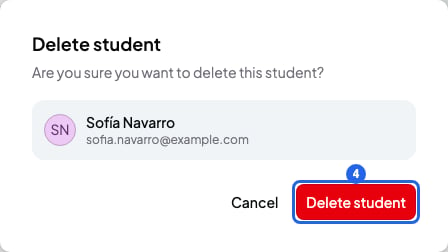
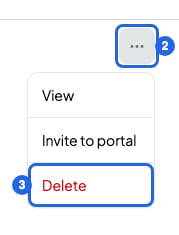 4. In the **Delete student** window, check it's the right student and click **Delete student**. You'll see "Student deleted successfully" and the student disappears from your list.
 You can also delete them from their page: on the card with their name, click the three-dot button (**More options**), then **Delete**.
## Delete several students at once
1. In **Students**, tick the box of each student. A bar appears at the bottom showing how many you've selected.
2. In that bar, click the bin (**Delete**).
You can also delete them from their page: on the card with their name, click the three-dot button (**More options**), then **Delete**.
## Delete several students at once
1. In **Students**, tick the box of each student. A bar appears at the bottom showing how many you've selected.
2. In that bar, click the bin (**Delete**).
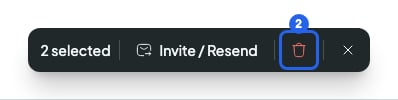 3. In the window, click **Delete**. You'll see a message with how many students were deleted.
## What gets deleted and what stays
* They leave all their courses and all their sessions, past and future. The sessions stay in your calendar, without them, and their attendance is deleted.
* If they were the student of a **1 to 1 lessons** course, the course and its sessions are left with no student. You can add someone else or delete the course.
* Sessions they booked from your booking link stay in your calendar, without them. SmartCookie doesn't tell them.
* Their session packs are deleted.
* If they had student portal access, their account is deleted and they can no longer log in.
* Your session notes and quick notes stay: they belong to the course, not the student.
* Your bills stay in **Payments**, with their name. Paid ones stay paid.
* If they have an unpaid bill, its payment link still works, but SmartCookie no longer sends them reminders.
* If they have a scheduled bill, it's issued on its day but not emailed to them. If you no longer want to send it, cancel it first: [Mark a bill as paid or cancel it](/en/payments/mark-paid-or-cancel).
* If they got Google Calendar invitations, they stay invited to those events. They're removed from each one when you change and save that session in SmartCookie.
## What you can't do
* You can't undo it or get a deleted student back. If they return, add them again: they'll start with no history.
* You can't archive a student to keep their history. If they're only leaving a course, remove them from the course. If you only want to stop them logging in to the portal, remove their access: [Invite students to the portal](/en/student-portal/invite-students).
* You can't send them new bills once they're deleted.
* You can't select students from several pages at once. Each page shows 20.
## Related articles
* [Add or remove students from a course](/en/courses/add-or-remove-students)
* [Invite students to the portal](/en/student-portal/invite-students)
* [Mark a bill as paid or cancel it](/en/payments/mark-paid-or-cancel)
* [Add or import students](/en/students/add-students)
3. In the window, click **Delete**. You'll see a message with how many students were deleted.
## What gets deleted and what stays
* They leave all their courses and all their sessions, past and future. The sessions stay in your calendar, without them, and their attendance is deleted.
* If they were the student of a **1 to 1 lessons** course, the course and its sessions are left with no student. You can add someone else or delete the course.
* Sessions they booked from your booking link stay in your calendar, without them. SmartCookie doesn't tell them.
* Their session packs are deleted.
* If they had student portal access, their account is deleted and they can no longer log in.
* Your session notes and quick notes stay: they belong to the course, not the student.
* Your bills stay in **Payments**, with their name. Paid ones stay paid.
* If they have an unpaid bill, its payment link still works, but SmartCookie no longer sends them reminders.
* If they have a scheduled bill, it's issued on its day but not emailed to them. If you no longer want to send it, cancel it first: [Mark a bill as paid or cancel it](/en/payments/mark-paid-or-cancel).
* If they got Google Calendar invitations, they stay invited to those events. They're removed from each one when you change and save that session in SmartCookie.
## What you can't do
* You can't undo it or get a deleted student back. If they return, add them again: they'll start with no history.
* You can't archive a student to keep their history. If they're only leaving a course, remove them from the course. If you only want to stop them logging in to the portal, remove their access: [Invite students to the portal](/en/student-portal/invite-students).
* You can't send them new bills once they're deleted.
* You can't select students from several pages at once. Each page shows 20.
## Related articles
* [Add or remove students from a course](/en/courses/add-or-remove-students)
* [Invite students to the portal](/en/student-portal/invite-students)
* [Mark a bill as paid or cancel it](/en/payments/mark-paid-or-cancel)
* [Add or import students](/en/students/add-students)