> ## Documentation Index
> Fetch the complete documentation index at: https://docs.smartcookieapp.com/llms.txt
> Use this file to discover all available pages before exploring further.
> ## Agent Instructions
> This is the SmartCookie help center for teachers and their students. Answer in the reader's language (Spanish pages have no prefix, English pages start with /en). Only describe features documented here; if something is not documented, say you don't know and point to /contact-support.
# Join a team and switch spaces
> Accept an invite to a SmartCookie team, move between teams or create your own space.
To join a team, open the invite email and click **Join the team**. You need to log in with the same email the invite was sent to. Joining is free: the team's membership covers you. If you also have your own space, its membership is separate.
## Accept the invite
1. Open the invite email: "\[name] has invited you to \[team]".
2. Click **Join the team**. The invite opens in SmartCookie.
3. If you see the **Continue as** button (with your email), click it and log in to SmartCookie, as explained below. Then you come back to the invite.
4. Click **Join** (with the team's name). The team's **Home** opens.
### Log in if you already have an account
1. Click **Continue with email**, or the Google button if you use Google. With Google, you come straight back to the invite.
2. Type your password.
3. Click **Login**. You come back to the invite.
### Create your account if you're new
1. Click **Continue with email**, or the Google button. With Google, you come straight back to the invite.
2. Type a password in **Password** and again in **Confirm password**.
3. Click **Register**.
4. Open the confirmation email and click **Verify Email Address**. You come back to the invite.
Do you see "This invite is for…"? You're logged in with another account. Click **Log out and continue** and log in with the invite's email.
Do you see "This invite is no longer valid"? It expired or was already used. Invites last 7 days: ask the person who invited you for a new one.
## Switch teams
The team switcher is the name at the top of the menu on the left. It lists your own space, if you have one, and the teams you were invited to. If you already used SmartCookie, you keep your space. Your space and the team are separate: the team's coordinator doesn't see your courses, students or payments.
1. At the top of the menu on the left, click the team's name.
2. Choose another team or your space. SmartCookie reloads and takes you to its **Home**.
Next to each name you'll see your role: **Coordinator** in your space and **Teacher** in the teams you were invited to.
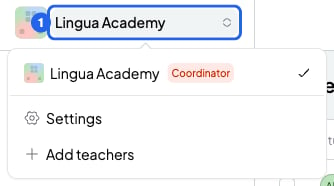 If you're a teacher on a team, the switcher also has **Team settings**. If you have no space of your own, it also has **Create my own space**.
## Create your own space
If you're only on teams you were invited to, you can create your own space for your own students.
1. At the top of the menu on the left, click the team's name.
2. Click **Create my own space**. SmartCookie reloads and takes you to your new space.
Your space carries your name and starts with a 14-day free trial. There, you're the coordinator. See [Free trial and SmartCookie membership](/en/account/trial-and-plans).
## What you can't do
* You can't join with a different email from the invite's. Instead, ask for an invite to your other email.
* You can't join with a student account.
* You can't have more than one space of your own.
## Related articles
* [Coordinator and teacher: what each one can do](/en/team/roles)
* [Remove a teacher or leave a team](/en/team/remove-or-leave)
* [Free trial and SmartCookie membership](/en/account/trial-and-plans)
This documentation is built and hosted on [Mintlify](https://mintlify.com), a developer documentation platform.
If you're a teacher on a team, the switcher also has **Team settings**. If you have no space of your own, it also has **Create my own space**.
## Create your own space
If you're only on teams you were invited to, you can create your own space for your own students.
1. At the top of the menu on the left, click the team's name.
2. Click **Create my own space**. SmartCookie reloads and takes you to your new space.
Your space carries your name and starts with a 14-day free trial. There, you're the coordinator. See [Free trial and SmartCookie membership](/en/account/trial-and-plans).
## What you can't do
* You can't join with a different email from the invite's. Instead, ask for an invite to your other email.
* You can't join with a student account.
* You can't have more than one space of your own.
## Related articles
* [Coordinator and teacher: what each one can do](/en/team/roles)
* [Remove a teacher or leave a team](/en/team/remove-or-leave)
* [Free trial and SmartCookie membership](/en/account/trial-and-plans)
This documentation is built and hosted on [Mintlify](https://mintlify.com), a developer documentation platform.