> ## Documentation Index
> Fetch the complete documentation index at: https://docs.smartcookieapp.com/llms.txt
> Use this file to discover all available pages before exploring further.
> ## Agent Instructions
> This is the SmartCookie help center for teachers and their students. Answer in the reader's language (Spanish pages have no prefix, English pages start with /en). Only describe features documented here; if something is not documented, say you don't know and point to /contact-support.
# Coordinator and teacher: what each one can do
> What a team's coordinator can see and change, and what each teacher on the team can see and change.
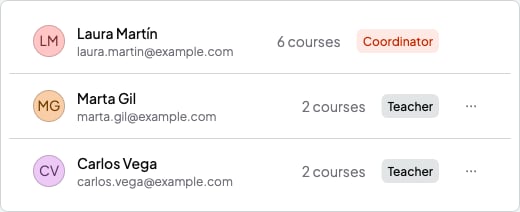
A team has two roles. The **Coordinator** is the person who created the space and pays for the membership. A **Teacher** is each person who joins with an invite. You'll see the role next to each name in **Profile** > **Your business** > **Teachers**. The team switcher shows your role in each team.
 ## What the coordinator can do
They can do almost everything in SmartCookie, for the whole team (they don't see each teacher's notes or events):
* See and change every course, student and session on the team.
* Create courses and decide which teacher teaches each one.
* Send bills and use **Payments**.
* See **Analytics**.
* Invite and remove teachers, and change the team's name and logo.
* Manage the **Plan**, which pays for the whole team.
Each team has a single coordinator. You can't change a teacher's role.
## What a teacher sees
* In the menu on the left: **Home**, **Calendar**, **Courses** and **Students**. They don't see **Payments** or **Analytics**.
* Only the courses the coordinator assigns them, with their sessions.
* Only the students in their courses.
* In their settings (**Profile**, from their photo at the top right), the menu on the left only has **Profile**, **Integrations** and **General**. In **General** they see the team's name and logo (what the coordinator sees in **Your space**), but can't change them.
A teacher doesn't pay anything: their access is included in the team's membership.
## What a teacher can do
* Change and delete the sessions in their courses, all the sessions in a series (the ones that repeat) too.
* Mark attendance for their sessions.
* Write session notes and quick notes. Nobody else on the team sees them, not even the coordinator. The session's students see **Shared notes**. If the teacher leaves the team, their session notes go to whoever takes over their courses.
* Add events to their calendar. Only the person who creates them sees them.
* Connect their Google Calendar in **Integrations**.
## What a teacher can't do
* They can't add sessions. Instead, the coordinator adds them in the teacher's course.
* They can't create, change or delete courses.
* They can't add, change or delete students, add them to a course or give them packs.
* They don't see bills.
* They don't have their own booking link or availability.
## Related articles
* [Build your team and invite teachers](/en/team/build-your-team)
* [Assign courses to your teachers and see their calendar](/en/team/assign-courses)
* [Remove a teacher or leave a team](/en/team/remove-or-leave)
This documentation is built and hosted on [Mintlify](https://mintlify.com), a developer documentation platform.
## What the coordinator can do
They can do almost everything in SmartCookie, for the whole team (they don't see each teacher's notes or events):
* See and change every course, student and session on the team.
* Create courses and decide which teacher teaches each one.
* Send bills and use **Payments**.
* See **Analytics**.
* Invite and remove teachers, and change the team's name and logo.
* Manage the **Plan**, which pays for the whole team.
Each team has a single coordinator. You can't change a teacher's role.
## What a teacher sees
* In the menu on the left: **Home**, **Calendar**, **Courses** and **Students**. They don't see **Payments** or **Analytics**.
* Only the courses the coordinator assigns them, with their sessions.
* Only the students in their courses.
* In their settings (**Profile**, from their photo at the top right), the menu on the left only has **Profile**, **Integrations** and **General**. In **General** they see the team's name and logo (what the coordinator sees in **Your space**), but can't change them.
A teacher doesn't pay anything: their access is included in the team's membership.
## What a teacher can do
* Change and delete the sessions in their courses, all the sessions in a series (the ones that repeat) too.
* Mark attendance for their sessions.
* Write session notes and quick notes. Nobody else on the team sees them, not even the coordinator. The session's students see **Shared notes**. If the teacher leaves the team, their session notes go to whoever takes over their courses.
* Add events to their calendar. Only the person who creates them sees them.
* Connect their Google Calendar in **Integrations**.
## What a teacher can't do
* They can't add sessions. Instead, the coordinator adds them in the teacher's course.
* They can't create, change or delete courses.
* They can't add, change or delete students, add them to a course or give them packs.
* They don't see bills.
* They don't have their own booking link or availability.
## Related articles
* [Build your team and invite teachers](/en/team/build-your-team)
* [Assign courses to your teachers and see their calendar](/en/team/assign-courses)
* [Remove a teacher or leave a team](/en/team/remove-or-leave)
This documentation is built and hosted on [Mintlify](https://mintlify.com), a developer documentation platform.