
Remove a teacher from your team
Only the coordinator can do this.- Click your profile photo (or your initials) at the top right.
- Click Profile.
- In the menu on the left, under Your business, click Teachers.
- On the teacher’s row, click the three-dots button.
- Click Remove from team. The Who takes over their courses? window opens.
- In Teacher, choose who takes over their courses: you or another teacher.
- Click Remove and reassign. The teacher disappears from the list.
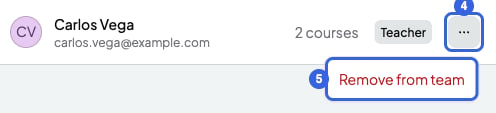
A teacher's menu. The blue numbers are the steps.
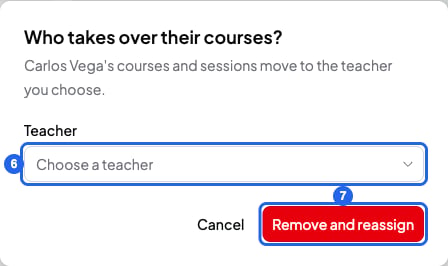
Choose who takes over the courses. The blue numbers are the steps.
- Their courses move to the teacher you choose, with all their sessions (past ones and series too) and their session notes. From then on, the new teacher sees those notes.
- They lose access to the team straight away. Their SmartCookie account stays active.
- Their sessions disappear from their Google Calendar. Future ones move to the new teacher’s Google Calendar, if they have it connected.
- From then on, you stop paying for that teacher. What you already paid for the time left comes off your next payments.
- The teacher doesn’t get an email.
Leave a team
If you’re a teacher on a team, you can leave whenever you like.- At the top of the menu on the left, click the team’s name.
- Click Team settings. General opens.
- On the Leave team card, click Leave team. A window opens to confirm.
- Click Leave. SmartCookie reloads and takes you to your space or another of your teams.
What you can’t do
- The coordinator can’t leave their own team or remove themselves.
- You can’t undo a teacher leaving, whether they leave or you remove them. To come back, they need a new invite: Join a team and switch spaces.
- You can’t remove a teacher without moving their courses to someone else on the team.