
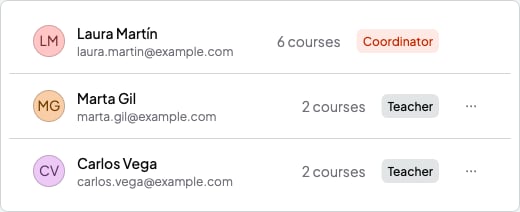
The roles, in Teachers
What the coordinator can do
They can do almost everything in SmartCookie, for the whole team (they don’t see each teacher’s notes or events):- See and change every course, student and session on the team.
- Create courses and decide which teacher teaches each one.
- Send bills and use Payments.
- See Analytics.
- Invite and remove teachers, and change the team’s name and logo.
- Manage the Plan, which pays for the whole team.
What a teacher sees
- In the menu on the left: Home, Calendar, Courses and Students. They don’t see Payments or Analytics.
- Only the courses the coordinator assigns them, with their sessions.
- Only the students in their courses.
- In their settings (Profile, from their photo at the top right), the menu on the left only has Profile, Integrations and General. In General they see the team’s name and logo (what the coordinator sees in Your space), but can’t change them.
What a teacher can do
- Change and delete the sessions in their courses, all the sessions in a series (the ones that repeat) too.
- Mark attendance for their sessions.
- Write session notes and quick notes. Nobody else on the team sees them, not even the coordinator. The session’s students see Shared notes. If the teacher leaves the team, their session notes go to whoever takes over their courses.
- Add events to their calendar. Only the person who creates them sees them.
- Connect their Google Calendar in Integrations.
What a teacher can’t do
- They can’t add sessions. Instead, the coordinator adds them in the teacher’s course.
- They can’t create, change or delete courses.
- They can’t add, change or delete students, add them to a course or give them packs.
- They don’t see bills.
- They don’t have their own booking link or availability.