

Hours and reply times
- WhatsApp (+34 611 151 527): usually right away, Monday to Friday, 08:00 to 18:00 (Spain time).
- Email (info@smartcookieapp.com): usually within 12 hours.
- Form in SmartCookie: usually within 12 hours. See below for how to use it.
Send a message from SmartCookie
- Log in to SmartCookie.
- Click your profile picture (or your initials), top right.
- Select Help & support.
- Fill in the Subject.
- Fill in the Message.
- If you like, add screenshots or PDFs under Attachments.
- Click Send message. You’ll see Message sent! and we’ll reply to the email you use to log in.
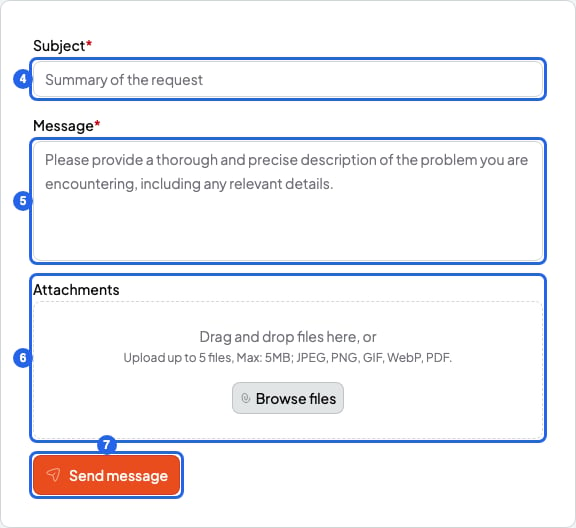
The Help & support form
Form limits
What to tell us
To help you faster, tell us:- What you did, step by step.
- What you expected to happen.
- What happened instead.
- A screenshot of what you see (a phone photo of your screen works too).
If you’re a student
Your teacher manages your sessions, bookings and payments in SmartCookie. Write to your teacher first: they can change a session or check a payment.If the form doesn’t work for you
- You need to be logged in to use the form. If you can’t get into your account, write to us by email or on WhatsApp.
- You can send up to 5 messages per hour from the form. If you need to write again, use email or WhatsApp.