
Add students from the course page
- In the menu on the left, click Courses and open the course.
- Click the Students tab.
- Click Add student, to the right of the tabs.
- Choose From students.
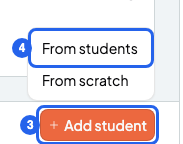
The menu to add students
- In Select students, type a name and click the student. Repeat to add more.
- Click Add student (or Add students, if you chose several). You’ll see your students in the course list.
Add a student from their page
- In Students, click the student.
- On their page, in the Courses section, click Add to course.
- In Course, choose the course. You only see Group lessons courses they’re not in yet, and 1 to 1 lessons courses with no student.
- Click Add. The course appears on their page.
Remove a student from a course
- In Courses, open the course and click the Students tab.
- In the student’s row, click the three-dot button on the right.
- Click Delete student.
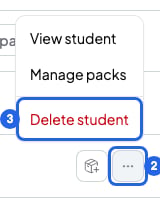
The menu for a student in the course
- Read What happens on removal and click Remove student. The student disappears from the course list.
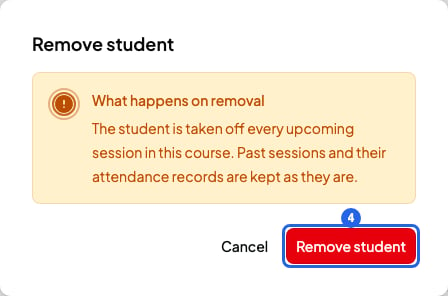
The window to confirm
What happens when you remove a student
- Group lessons: they leave all the course’s upcoming sessions. Past sessions and their attendance stay.
- 1 to 1 lessons: all the course’s upcoming sessions are deleted. Past sessions and their attendance stay.
- Their pack for this course and your bills aren’t deleted. You can still charge them for their past sessions.
- SmartCookie doesn’t tell your student.
- If you’ve connected Google Calendar, these changes don’t reach Google Calendar by themselves. They get there when you change and save each session in SmartCookie.
What you can’t do
- You can’t have more than one student in a 1 to 1 lessons course. If you try, you’ll see “The course already has a student”. Create another course for the new student.
- You can’t add or remove students in Meetings 1 to 1 or Open doors. People join by booking from your booking link.
- You can’t remove a student from a course on their page. Do it from the course page.