
The 4 types at a glance
Your booking link is your public page where people pick a day and time to book. We explain it in Share or change your link.
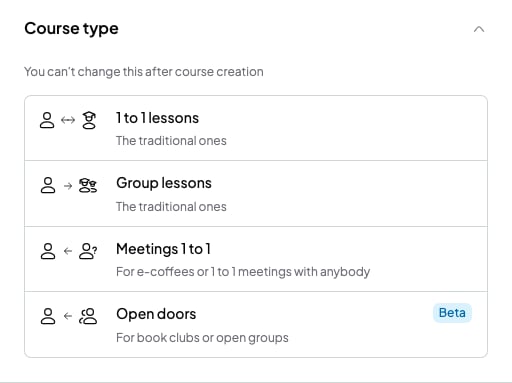
The 4 course types, when you create a course
1 to 1 lessons
For your usual sessions with a single student. For example, “B2 English with Lucía”.- The course has a single student.
- You add the sessions to your calendar.
- Online booking is on from the start. So your student can also book sessions in the free slots of your availability, from your booking link.
- To book, your student types their email. It must be the same email you saved in SmartCookie.
- If they type a different email, SmartCookie doesn’t find the course and they can’t book.
Group lessons
For fixed groups, with the same students every week. For example, “Tuesday B1 conversation”.- You add the students to the group.
- You schedule the sessions. Each session includes every student in the course.
- Nobody books online in this course type.
Meetings 1 to 1
For one-off sessions with anyone, like a trial session or a get-to-know-you coffee. For example, “Free trial session”.- Anyone books a slot of your availability from your booking link. They don’t need an account.
- You don’t add sessions or students: each booking creates its own session.
- Whoever books shows up in your Students list, with their name and email.
Open doors
For open groups, where each session can have different people. For example, a book club. It’s marked Beta: it’s new and we’re still improving it.- You schedule the group sessions and set how many places each one has, in Max participants.
- Anyone books a place from your booking link, until the session is full.
- You don’t add students: whoever books shows up in your Students list.
How to choose
- Are your sessions always with the same person? Choose 1 to 1 lessons.
- Do you have a fixed group of students? Choose Group lessons.
- Do you want new people to book a slot with you? Choose Meetings 1 to 1.
- Do you run a group open to anyone who wants to come? Choose Open doors.
What you can’t do
- You can’t change a course’s type. If you pick the wrong one, create a new course with the right type.
- You can’t have more than one student in 1 to 1 lessons. For several students, use Group lessons.
- You can’t turn on online booking in Group lessons.
- You can’t add students by hand in Meetings 1 to 1 or Open doors. They join when they book.