
Before you start
- Open a new bill and tick what you want to charge for: Send a bill to a student.
Add a discount or a surcharge
- In the new bill, scroll down to the Adjustment row.
- Choose the type of adjustment: % for a percentage or € (your currency’s symbol) for a fixed amount. If you switch type, the number goes back to 0.
- Type the number. With a minus sign in front it’s a discount: -10 takes off 10% or €10. Without a sign it’s a surcharge.
- Check the Total: it already includes the adjustment.
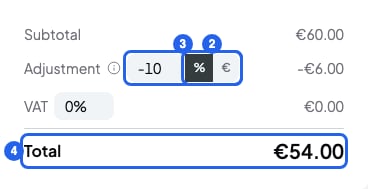
A 10% discount on a bill
Change the VAT on a bill
Each new bill takes the VAT rate from your billing details. If you usually charge the same VAT, change it there: Fill in your billing details. To change it on one bill only:- In the VAT row, delete the percentage and type the new one. For example, 21.
- Check the Total: it already includes the VAT.
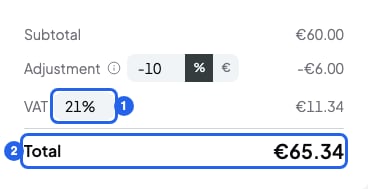
21% VAT on a bill
How the total is worked out
SmartCookie applies the adjustment first, then works out the VAT on the adjusted amount. For example:- 2 sessions at €30: €60.
- Adjustment of -10%: -€6. That leaves €54.
- VAT at 21% on €54: €11.34.
- Total: €65.34.
What you can’t do
- You can’t change the adjustment or the VAT after you create the bill. Cancel it and create a new one: Mark a bill as paid or cancel it.
- A % adjustment goes from -100 to 100. VAT goes from 0% to 100%.
- A fixed discount can’t be bigger than what you’re charging on the bill.
- The total can’t go below your currency’s minimum (€0.50 in euros). If it’s 0 or less, you can’t click Create. If it’s between 0 and the minimum, you’ll see a warning when you click Create.